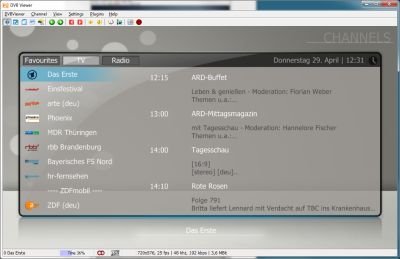
DVBViewer v4.5 based on 4.9.6.2


DVBViewer v4.5 based on 4.9.6.2

working , but does not have the DVBViewer Recording Service
Thanks, but how do I stop this creating EPG info file?


 Re: DVBViewer Software
-Update 10.04.2013-
Transponders Edit_4_0_0
DVBViewer 5.0 PRO update to 5.1
-Update 19.12.2020-
DVBViewer_Pro_v7.0.0
Download DVBViewer


[*.Update 23.04.2023]
DVBViewer PRO v.7.2.4.0
Change Log
Change: Recorder: Handling of loading/saving the timer list from/to the file timers.xml for avoiding data loss on crashes (see here):
If the file timers.xml can not be loaded, because it is corrupted, DVBViewer now automatically replaces it by the file timers.bak, which contains the previous timer list state before the last saving. Previously DVBViewer preserved an already existing timers.xml by renaming it to timers.bak before saving a new one, but did not use it.
If the file timers.xml is detected as invalid on loading, it is deleted or renamed, so it cannot become timers.bak anymore on next saving. Renaming occurs if there is still some content in the file. The new name is timers[yyyymmddhhnnss].bak, where [yyyymmddhhnnss] is the current date and time, e.g. timers20230105100634.bak. This file can be used for manual repair attempts.
DVBViewer now avoids unnecessary saving of the timer list right after loading the timers.xml on DVBViewer start and before the PC enters sleep mode / hibernate. In the latter case usually all timer list changes have been saved before. However, the list is still saved on closing DVBViewer “just in case” to make sure that the current state of the timer list is identical with the one on disk. Normally this yields identical timers.xml and timers.bak files.
Added: Timer Recording and Recording Statistics Window: The list views in these windows now also respond to tilting the scroll wheel or rotating the horizontal scroll wheel by horizontal scrolling (previously only in the EPG Window).
Fix: TV/Radio Playback: On Rebuild Playback the (stored) ID of the last channel was overwritten by the ID of the current channel, so that the Last Channel function subsequently performed a retune instead of returning to the previous channel.
Added: Channel Editor: Automatic conversion of a user agent indication in imported M3U IPTV lists (#EXTVLCOPT:http-user-agent=…) to an equivalent DVBViewer URL appendix (?addhdr=User-Agent:…, see here).
Change: Channel Search: In order to make a channel search more comprehensible for first-time users, the “Scan” button on the Reception Settings panel and the “Scan Range” button on the Channel Search panel have both been renamed consistently to “Channel Search” (see here). However, the function remains unchanged. It lets DVBViewer scan all frequencies starting with the one selected in the “Start” field up to (and including) the one selected in the “End” field.
Change/Added: Channel Search: The “Scan Frequency” button above “Scan Range”, that previously let DVBViewer scan a single frequency selected in the “Start” field, has been substituted by a different button at a different place. Altogether there are three possibilities to scan a single frequency:
The new “Scan” button next to the “Start” field for scanning the frequency selected here.
The new “Scan” button next to the “End” field for scanning the frequency selected here.
The “Scan this Frequency” item in the (right-click) context menu of a selected channel for scanning its frequency. It does not change the start frequency to the channel frequency anymore, previously requiring an additional click on “Scan Frequency”, but immediately triggers the scan.
Change/Fix: Subtitles: Enhancements concerning TTML subtitles, that are preferably used for MPEG Dash streams. Additional styling methods for colors, markup and text position are now recognized and applied.
Fix: Subtitles: DVBViewer used “fully transparent” as wrong default value for subtitles background. It was temporarily adjusted to the intended “half transparent” by opening the subtitle options, but permanently corrected only by applying them after some change.
Added: Hardware Options: Tweak “Allow BDA tuner re-detection by name” (→ launch Tweaker.exe). Switching this option on allows DVBViewer to re-detect BDA tuners by name if Windows has changed the hardware ID (e.g. after driver installation or a reboot). Retrieving "lost" tuners is performed on DVBViewer start. It avoids "No matching DVB device available" messages and a manually performed "Scan Devices" (see here). Please note: This option should only be applied if really necessary, because two or more tuners with the same name and tuner type (DVB-S/T/C) could be mistaken for each other. After a resulting automatic correction of hardware IDs DVBViewer updates the file hardware.xml immediately.
Change: Hardware: On tuner availability checks and tuner initialization DVBViewer now only searches for a device with matching ID in the Windows device enumeration. It does not additionally compare the tuner name anymore (see here).
Fix: Hardware Options: For some hybrid/multi-standard BDA tuners a wrong identification string was created on device detection and subsequently transmitted to other simultaneously running applications from the DVBViewer family (e.g. TransEdit), so that they could not recognize a tuner occupation by DVBViewer and vice versa. Please note that performing a new device detection in Settings → Options → Hardware is necessary for the fix to take effect.
Change: TS Stream: Changed timing when receiving radio streams in order to avoid problems with unsteadily arriving data.
Fix: HbbTV: “arte Mediathek” did not work anymore, caused by a changed HbbTV version indication in the HbbTV user agent string (since 7.2.3).
Fix: HbbTV: Due to a bug ARD and ZDF HbbTV videos did not become visible in Automatic Color Key mode, because they remained covered by the HbbTV OSD. Furthermore, due to the same bug, the playback of ZDF HbbTV videos was stopped after some time (since 7.2.3).
Fix: HbbTV: An additional empty line in the HTTP header could cause servers to send no response.
Fix: General: A runtime library function for conversion of 64 bit integer numbers to text yielded wrong results (particularly concerning Channel IDs), if DVBViewer was running on Apple hardware with ARM M1/M2 CPU in a Parallels Desktop virtual machine.
Fix: General: Uninstalling DVBViewer left a still installed Media Server in an unusable state and even prevented uninstalling the Media Server subsequently, if the user opted for DVBViewer program directory deletion. Therefore the DVBViewer uninstaller now prompts the user to uninstall the Media Server first, if it finds DVBVservice.exe, and terminates without doing something.
Updated: OpenSSL Libraries to version 1.1.1t (see here).
Download DVBViewer Pro Demo 7.2.4.0
DVBViewer PRO
Versıon: 7.3.1.9 beta
UPTADE: 18.08.2025
Latest version
7.3.1.0 / 7.3.1.9 Beta (August 18, 2025)
Screenshots
DOWNLOAD
Software » DigitalTV/DVB » DVBViewer 7.3.1.0 / 7.3.1.9 Beta
Download
Visit developer's site
Download DVBViewer 7.3.1.07.8MBWin
Download Beta and other versions
Download DVBViewer 7.3.1.9 BetaWin
 Posting Permissions

 Reply With Quote