
ramin ultimo e ka njilloi me unon 512mb kurse flashin e ka me te madh nga te gjithe pastaj po ta instalosh imagen ne usb apo hardisk se kan problem per ramOriginally Posted by arber






ramin ultimo e ka njilloi me unon 512mb kurse flashin e ka me te madh nga te gjithe pastaj po ta instalosh imagen ne usb apo hardisk se kan problem per ram


Imagi i ri Cubic!
Release: Cubic 1.2.0 für VU+
English:
VU+ with 3.1.1 Kernel
Driver Date: 28.02.2012
OE Date: 28.032012
DVBAPP Date: 28.03.2012
Neu: Cubic HD Skin
Neu: Cubic Panel has now a version specification (Currently, the panel v.1.2.4)
Neu: Cubic Panel About shows now some image information more (Imageversion, Branch, Kernel, Hardwaretype)
Neu: Menu to run directly Scripts on the panel Cubic
Neu: Cronmanager to execute scripts timebased
Neu: ext4 Support (New devices are now formated as ext4 Formats)
Neu: Crashlog Reporter - Crashlogs sends directly to the developers from Cubic (at Cubic Panel Disabled. You kann activated them if you want use this)
Neu: Shareinfobar with gbox Support (On / Off switchable)
Neu: Own Second Infobar (If a foreign Skin will bring the part will be ignore our SecondInfoBar)
Neu: epg.dat can be stored on USB
Neu: openWebIF in the Image
Fix: Cam is active display shows nothing if no cam is active. Now displays "no cam running"
Fix: If the CamName is too long, this entry is cut off
Fix: Some translations in Cubic Panel
Fix: Information function in the device manager now works
Änderung: Offline Installer has now a GUI restart query
Änderung: Online Addon Installer has now a GUI restart query when an addon was installed or updated.
Änderung: Altered newsfeed reader
Änderung: Modified software manager (Shows now modules and settings)
Änderung: New Swap Managment
minor fixes in various files!
unnecessary Pyhton code in our files deleted
Support of VU+ Backupsuite (Plug-in is on the feed)
Support of nano
ONLY on Cubic VU+ (Not on Cubic Dreams) : Support for relative skin coordinates ( 'c' and 'e' ) Thanks at pieterg for the Patch
Thanks to all users who give us their feedback.
Thanks to the group of Beta Testers.
Thanks to all supporters in the background.
Thanks to openee for the Basecode of the DeviceManager.
Thanks to the project E2OpenPlugins. We hope we will soon be able to give something back to the Community.
Thanks to pieterg for his relative Coordinates Patch .
Thanks to vlamo for nice Ideas and good Work.
vuultimo_NFI_cubic_120_official_release. zip
vuultimo_USB_cubic_120_official_release. zip
vuuno_USB_cubic_120_official_release.zip
vuuno_NFI_cubic_120_official_release.zip
vuduo_USB_cubic_120_official_release.zip
vuduo_NFI_cubic_120_official_release.zip
vusolo_USB_cubic_120_official_release.zi p
vusolo_NFI_cubic_120_official_release.zi p

po per clone ben ky image
skam klon dhe as do kem,
kete nuk e di a ben por shiko neper forume ku i bejn support klonit dhe ndoshta gjen dicka.
po te kerkosh neper forume ke procedure se si ti beshe update botloderit dhe me pase i vendos cfare imagi te duash
Imagi i ri Black Hole Vu+ 1.7.3 (Skin Tribute)
This version is dedicated to our great skinners Army and Matrix10 that worked from so many years for all us and making wonderful skins and teaching to new skinners too.
The skin included in this release is an awesome new edition of the famous Army Gradient.
What's new:
- Army skin Gradient NextGen
- latest Vu+ drivers
- dvbapp: 20120407
- New Vu+ wifi dongle drivers: realtek r8192cu 3.3.2
- kernel: add keyboard modules
- New bootlogos by Army
- New device panel
- New Usb format wizard
- Next event in channel
- Channel number in osd
- fix addons enigma restart (reload settings)
- fix mediatomb autostart
- Add e2openplugins recipe
- Crossepg: Update to latest version
- Add Openwebif instead of old webinterface
- About: cosmetic changes
About new device panel:
You can now mount all your hdd and usb mass storage in your preferred mountpoints.
There are many mountpoints available by default (hdd, usb, personal, music, photo, video..) and you can also add your own customized mount points simply adding the folder under the /media/ directory
About new Black Usb Format Wizard:
An easy and very helpful way to format all your Usb stick or hdd with Linux filesystem.
WARNING: This Image has the latest drivers and CAN NOT be installed in multiboot.
The image MUST be installed in the flash.
Black Hole can not support images not installed in the flash.
This latest version of the Black Hole series has been entirely rewritten and improved in the code for maximum stability and performance.
Please note that of all images Black Hole now has the best epg system:
- Integrated OpenEpg
- Rytec dedicated epg.dat
- New system epg.dat outside.
This last feature gives the possibility to various forums or communities to create their favorite EPG data files and load them into a web space.
Community members can then download it from our servers.
This feature provides other benefits such as:
Increase download speed of EPG
Download EPG from any channel
Schedule the download of EPG decoder even during standby
Users can customize the providers using Add / Remove function
Main functions of the buttons on the remote
OK button = Skin with simple information
OK button x 2 = Extra Info Skin
Blue button = Black Hole Blue Panel
Blue button and then Red button = Black Hole Epg Panel
Blue button and then Yellow button = System Monitor Panel
Blue button long press = Extensions
Yellow button = Time Shift
Green button = Black Hole Green Panel
Green button long press = Subservices
Green button and then Red button = Fast Plugin Setup
Green button x 2 = Fast Plugin
Button Red = Start Record
Addons
Green button and then Yellow button takes you to:-
Dedicated server for BlackHole addons
Download and install additional packages from the Black Hole server
Infobar / OSD
Analog Clock Gui
Channel orbital location
Advanced Tuner Info: Sr Freq Pol Fec
Signal SNR, BER
Infobar picons
Characteristics of BlackHole Panels
Blue Panel
Extra Settings
Black Hole Cron Manager (Manage schedules)
OSD Settings (OSD configuration)
Devices Manager
Usb Format Wizard
Kernel Modules Manager(Kernel module operator)
Inadyn Settings (Configure Inadyn)
Swap File Settings (Configure File Swap)
Hard Disk Settings (Configure Hard Drive)
OpenVPN Panel ( OpenVPN Panel)
Samba / CIFS Panel ( Samba Panel)
NFS Server Panel ( NFS server Panel)
Telnet Panel ( Telnet Panel)
FTP Panel ( FTP Panel)
UPnP Client Djmount
UPnP Server Mediatomb
Tuner Server
Network Browse & Mountpoints
Info Panel
1 - Gui Setting (Gui configurations)
2 - Service Information (information system)
3 - About (info)
Memory (Memory)
Space (capacity)
CPU (processor)
Process (process)
EPG Panel
Global settings (global settings EPG)
Setting Provider (ISP settings)
Green Panel
Fast Plugin Setup (Configure quick access to your favourite plugin)
Fast Plugin (Access your favourite plugin)
Addons (added)
Addons Download Manager (Manager for package downloading)
Installation manual packages (Manual installation of Black Hole packages)
Manual Install IPK packages (Manual installation of IPK packages)
Addons Uninstall Panel (Uninstalled packages)
Black Hole Statistics (See connections, top downloads and more)
Credits
Thanks to Pedro_Newbie for Backup script
Thanks to the group of Beta Testers.
Thanks to Rytec for providing us with the server with all epg.dat files.
Thanks to MaxZ4 for Integrated EPG loader.
Thanks to Skaman for Cross EPG
Thanks to Lukkino (VDR-Italy) for the source code of OpenTV.
Thanks to Reinh@rd for the file satellites.xml.
Thanks to ambrosa (Pli Board) for ready-to-go A867 driver patch
DISCLAIMER
THE BLACK HOLE IMAGE IS BASED ON THE OFFICIAL FIRMWARE PUBLISHED BY VU+ AND IN ACCORDANCE WITH THE LAW IT CONTAINS ONLY SYSTEM ADDITIONS & GRAPHIC CHANGES.
THE BLACK HOLE IMAGE DOES NOT CONTAIN ANY EMULATOR, K E Y S, SOFTCAMS OR OTHER SYSTEM FOR VIEWING PAY - TV WITH OR WITHOUT A PAID SUBSCRIPTION.
LASTLY, THE BLACK HOLE IMAGE DOES NOT CONTAIN ANY SYSTEM TO DOWNLOAD PLUGINS OR EMULATORS FROM EXTERNAL SERVERS OR SOFTWARE THAT MAY BE USED FOR ILLEGAL PURPOSES SUCH AS CARD SHARING.
LICENSE (TERM OF USE)
THE BLACK HOLE IMAGE IS ISSUED FOR THE FREE USE FOR ALL USERS PROVIDED THAT IT WILL NOT BE CHANGED IN ANY WAY AND THAT IT WILL ONLY BE USED FOR LAWFUL PURPOSES.
ANY CHANGES OR ADDITIONS TO BLACK HOLE IMAGE THAT INVOLVE UNLAWFUL USE OF THE IMAGE SUCH AS CARD-SHARING AND EMULATORS ARE NOT ALLOWED AND CAUSE THE REVOKE OF THIS LICENSE.
This is free hobbyist software and it comes with absolutely no warranty. Use it at your own risk.
Vuplus Solo
Vuplus Duo
Vuplus Uno
Vuplus Ultimo
Imagi i ri Black Pole Vu+ 0.1.3
What's new:
Added Swap Manager
Fixed bug that cause many plugins thumbnails not working (Mytube Imdb Apple Trailers ecc...)
Vtuner removed (now usb tuners are managed internally enigma2)
Fix device panel bug
Fix blindscan
[IMG][/IMG]
WARNING: This Image has the latest drivers and CAN NOT be installed in multiboot.
The image MUST be installed in the flash.
Black Pole can not support images not installed in the flash.
Main functions of the buttons on the remote
OK button = Skin with simple information
OK button x 2 = Extra Info Skin
Blue button = Black Hole Blue Panel
Blue button and then Red button = Black Hole Epg Panel
Blue button and then Yellow button = System Monitor Panel
Blue button long press = Extensions
Yellow button = Time Shift
Green button = Black Hole Green Panel
Green button long press = Subservices
Green button and then Red button = Fast Plugin Setup
Green button x 2 = Fast Plugin
Button Red = Start Record
Addons
Green button and then Yellow button takes you to:-
Dedicated server for Black Pole addons Feeds
Infobar / OSD
Analog Clock Gui
Channel orbital location
Advanced Tuner Info: Sr Freq Pol Fec
Signal SNR, BER
Infobar picons
Characteristics of Black Pole Panels
Blue Panel
Extra Settings
Devices Manager & Mountpoints
Network Browse & Mountpoints
Usb Format Wizard
Swap File settings
OSD Settings
OSD Position setup
OSD 3D setup
Internal Epg Settings
Record settings
Recording paths
Subtitle settings
Auto Language Settings
Http stream settings
Info Panel
Box Info
Memory info
Storage info
Software info
EPG Panel
Crossepg settings
Green Panel
Fast Plugin Setup (Configure quick access to your favourite plugin)
Fast Plugin (Access your favourite plugin)
Addons (added)
Online Feeds Extensions
Online Feeds all Packages
Online Black Pole image update
Manual install Bh Packages
Manual install Ipk Packages
Addons Uninstall Panel
Credits
Thanks to the group of Beta Testers.
Special Thanks to Pli team and expecially to pieterg Milo and hemertje for their support and for the big work they are making for all us.
Thanks to Skaman (Sif) andyblac (Vix) e plnick (Vti) for their friendly support and suggestions.
DISCLAIMER
THE BLACK POLE IMAGE IS BASED ON THE OPENPLI DISTRO AND IN ACCORDANCE WITH THE LAW IT CONTAINS ONLY SYSTEM ADDITIONS & GRAPHIC CHANGES.
THE BLACK POLE IMAGE DOES NOT CONTAIN ANY EMULATOR, K E Y S, SOFTCAMS OR OTHER SYSTEM FOR VIEWING PAY - TV WITH OR WITHOUT A PAID SUBSCRIPTION.
LASTLY, THE BLACK POLE IMAGE DOES NOT CONTAIN ANY SYSTEM TO DOWNLOAD PLUGINS OR EMULATORS FROM EXTERNAL SERVERS OR SOFTWARE THAT MAY BE USED FOR ILLEGAL PURPOSES SUCH AS CARD SHARING.
LICENSE
THIS IS OPEN SOURCE SOFTWARE.
YOU CAN REDISTRIBUTE IT AND/OR MODIFY UNDER THE TERMS OF THE
GNU GENERAL PUBLIC LICENSE VERSION 2 AS PUBLISHED BY THE FREE
SOFTWARE FOUNDATION.
This is free hobbyist software and it comes with absolutely no warranty. Use it at your own risk.
Black Pole Vu+ Ultimo 0.1.3
Black Pole Vu+ Uno 0.1.3
Black Pole Vu+ Duo 0.1.3
Black Pole Vu+ Solo 0.1.3
Se shpejti do dalin ne treg Vu+ Duo II dhe Solo II
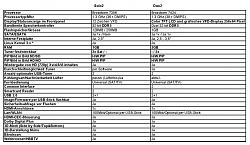
gjithashtu po i bashkangjis dhe une disa foto me gjithe te dhenat per medelet e rinj vu+
Vu+ se shpejti me 3 modele të reja VU + Duo2, Solo2 dhe Vu + Duo LE.
Modelet e reja kanë procesor dual core 1.3 GHz MIPS, HDMI 1.4, është 1080p, grafika 2D/3D
Vu + Solo 2 ka 2 tuner DVB S2 dhe merr HDD 2.5 HDD.
Vu + Duo 2 ka një ekran TFT 3.2 e ndërtuar në Wi-Fi, HbbTV dhe PIP HD.
Kto qenkan habi fare, kush e di sa lek do kushtojne !!
 Posting Permissions
