Advertise Here
Advertise Here
Advertise Here
Advertise Here
Page 2 of 2 FirstFirst 12
Results 11 to 18 of 18

Thread: Cool TV Guide VU+

  1. #11
    VIP Member wahid's Avatar
    Join Date
    14-04-2008
    Location
    M.S.T.
    Posts
    8,562
    Uploads
    2,422
    Likes
    173

    Re: Cool TV Guide V2.0.9

    Cool TV Guide V3.0.0 by Coolman


    Code:
    Multi Language
    
    V2.2.2 for OE 1.5
    
    from V3.0.0 for OE 1.6
    
    green = all channels are now running
    light blue = channel is selected
    blue = all channels
    red = recording
    
    "Pad"
    
    2 page high
    8 page down
    4 page left
    6 page right
    
    and switch on and zapping channels without EPG! (Adjustable)
    
    Pad to sew, as usual
    
    Reset to 5
    Full Reset to 0
    
    1 Zoom in
    3 Zoom out
    7 switching between 7-8 and 14-16-line display (adjustable)
    Switch 9 to 20 clock
    <Day - (Guide-dependent)
    > Day + (Guide-dependent)
    
    red = Zap (adjustable)
    langrot = Zap + exit (adjustable)
    green = timer (adjustable + edited)
    = green for shipment automatically add the Auto Timer (adjustable)
    yellow = cool switch (adjustable)
    long yellow bouquet = list (set)
    blue = cool search function (adjustable)
    Do you search long blue = function (adjustable)
    OK = Cool Info Guide (adjustable)
    langOK = (adjustable)
    Rec = QuickRec
    kurzEPG / Guide Info = Select (zap through all the guides)
    langEPG / Info = CoolTVGuide <> cool multi guide
    HELP = Display all commands
    Setup menu =
    TV = Timer List
    Power = Off Timer
    
    3D view / default view (selectable)
    / Usr/lib/enigma2/python/Plugins/Extensions/CoolTVGuide/Cool3D /
    it has 3 folders
    Standard (default view)
    Skindesigner (so that skins can insert your own design)
    MyDesign (for your self-made designer)
    thus can now make each person has their own look easy
    
    Cool TV Guide, Cool Multi Guide, Cool Info Guide, Cool Single Guide, Cool Easy Guide, CoolSearch und das Setup
    wurde in ein extra CoolSkin Ordner ausgelagert...
    somit könnt Ihr jetzt die Skinns ändern ohne neu zu starten
    
    Ausserdem habe ich Anmerkungen für die Skinner gemacht, damit Ihr es einfach einbauen könnt
    
    im Setup:
    
    Ihr könnt nun Eure Tasten selber belegen...
    da es hier ja nie eine Einigung gab
    die Höhe für Eure Picons einstellbar!
    somit könnt Ihr Eure Zellenhöhe und Rahmen selber bestimmen
    
    und Ihr könnt sogar die linken Abstände sowie die Anzahl Eurer Picons die Ihr sehen wollt einstellen!
    
    genause wie Picon ein und ausschalten!
    
    starte auf Kanal 1 (einstellbar)
    
    Primetime z.B. 20:15 (einstellbar)
    
    Fontgrösse, Spalten sogar die Timeline sind alle einstellbar!
    
    Startansicht wählbar zwischen 6-8 und 12-24-zeiliger Anzeige...
    
    Anzeige des Bouquets im Skin
    
    wer Bouquets hat wird sich genauso über das Setup freuen...
    einstellbar ist auch die Bouquet Anzeige bei Start On/Off
    aber ich finde es ist praktischer sich seine Bouquets auf ein Button zu legen...
    da das Plugin sich sowieso die Position und das Bouquet merkt...
    
    Standard Picon Suchpfad:
    /usr/share/enigma2/picon/
    
    Standard CoolPico (Mini-Picon) Suchpfad:
    /usr/share/enigma2/picon/coolpico/
    
    andere Piconpfade selber einstellbar !
    
    Ihr wählt also immer nur Euren Picon Ordner aus !
    wobei aber der coolpico Ordner immer im picon Ordner liegen muss
    
    super cool ist auch die CoolSearch Funktion...
    Sendung verpasst.. oder schon angefangen?
    kein Problem.. einfach den Blauen Button drücken und Ihr seht direkt wo eine Wiederholung läuft!!
    
    oder aber Ihr geht in das Cool Info Guide,
    dort habt Ihr das neue CoolSimilar
    das zeigt Euch für jede Sendung, ob es irgendwo nochmal gesendet wird
    
    
    wer seine Box an das Internet angeschlossen hat wird sich über IMDb freuen
    aber auch dazu müsst Ihr Euch noch das IMDb vom Feed laden...
    
    Timer Alarm !!!
    diese Funktion ist nagelneu und hat kein anderes EPG
    
    es checkt Eure Timeraufnahmen...
    werden Aufnahmen durch den Sender verschoben, liegen aber noch in der Zeit ohne angeschnitten zu werden,
    dann bleibt die Aufnahme Rot
    wird die Aufnahme aber angeschnitten, dann wird die Anzeige Gelb !
    also wenn Ihr einmal eine Gelbe Aufnahme seht, dann wird es höchste Zeit diese zu überprüfen !
    
    
    viel Spass damit!!
    
    
    Anleitung:
    
    das ipk ins TMP kopieren und wie alle plugins installieren...
    
    
    Achtung auf Wunsch mancher User:
    Cool TV Guide ist nicht im Pluginordner!
    also nicht unter Erweiterungen zu finden...
    aufgerufen wird es, in dem Ihr den Info/EPG-Button lange drückt...
    
    würde aber jedem empfehlen,
    das Multi Quickbutton VU+ Plugin modded by plnick zu installieren...
    somit könnt Ihr dann z.b. Cool TV Guide mit dem roten Buttom direkt aufrufen !!
    einfach installieren und Ihr habt den vollen Zugriff über Eure Tastenbelegung
    auch das VTI Panel, Plugins alles wurden schon für Euch von plnick vorkonfiguriert...
    für mich ein "must have" auf jeder VU+

  2. Advertise Here
  3. #12
    VIP Member fushkrujs's Avatar
    Join Date
    19-06-2009
    Posts
    3,015
    Uploads
    1,520
    Likes
    2,712

    Re: Cool TV Guide VU+

    UPDATE Cool TV Guide V5.1

    Hello,

    by popular demand

    You can now guide the keys on the color as well as info / EPG directly start

    You can now also access the menu from any guide ...

    In addition, the setup guide is also among the browser plugin to find ...

    As always, everything on and off one


    and many small improvements
    Thanks Coolman

  4. #13
    VIP Member fushkrujs's Avatar
    Join Date
    19-06-2009
    Posts
    3,015
    Uploads
    1,520
    Likes
    2,712

    Re: Cool TV Guide VU+

    UPDATE Cool TV Guide V5.6

    an extra thanks to them for their assistance and suggestions to:

    Betonme

    Zombi

    Swiss-MAD

    Salzrat

    which also have sacrificed your time to improve this update!

    -------------------------------------------------- -------------------------


    V5.6 with the times come again suuuper Cool News


    Because it somehow know not all users ...
    First an extra folder for CoolPico you no longer want
    So you can delete your CoolPico folder ...
    Thus, you save about 5-10 MB of disk space!

    Second the setting for the Piconpfad is therefore null and void ...

    and of course lots of little improvements


    should now also be eliminated all the bugs reported

    and many requests have been built ...


    Please note:
    who has an unmatched skin or gets a green.

    by the substantial changes must be adjusted some skins ...

    But everyone can sometimes make themselves quickly if needed ...

    goes to this:

    / usr/share/enigma2/EuerSkin /
    opens with the e.g. skin.xml Notepad + +

    studied there for CoolPico or CoolPicon

    it would look into something like this:

    <widget source="Service" render="CoolPicon" position="500,20" zPosition="1" size="50,30" alphatest="on">
    <convert type="CoolConverter"> Cool Event </ convert>
    <widget />

    deletes the line 2 and 3, and n at CoolPicon
    then it should just look like this:

    <widget source="Service" render="CoolPico" position="500,20" zPosition="1" size="50,28" alphatest="on" transparent="1" />

    and that makes all your locations found ...

    that's it ...

  5. #14
    VIP Member fushkrujs's Avatar
    Join Date
    19-06-2009
    Posts
    3,015
    Uploads
    1,520
    Likes
    2,712

    Re: Cool TV Guide VU+

    Cool TV Guide V5.6.1 by Coolman

    Multilanguage

    for OE 1.6

    green = all stations now run
    light blue = channel is selected
    blue = all channels
    red = recording

    "Pad"

    2 page vertical
    8 page down
    4 left side
    6 page right

    also switchen and zapping channels without EPG! (Adjustable)

    Pad with quilting, as usual

    Reset to 5
    Full Reset to 0

    1 Zoom in
    3 Zoom out
    7 Switch 4 guides (adjustable)
    Switch 9 to 20 clock
    <Day - (Guide-dependent)
    > Day + (depending Guide)

    red = Zap (adjustable)
    Zap langrot = + Exit (adjustable)
    green = timer (adjustable + editable)
    = green for shipment to the car automatically add timers (adjustable)
    yellow = Cool Switch (adjustable)
    long yellow bouquet = list (set)
    Blue = Cool Search function (adjustable)
    long blue = Do Search function (adjustable)
    OK = Cool Info Guide (adjustable)
    langOK = (adjustable)
    Rec = QuickRec
    kurzEPG / User Guide = select (zap through all the guides)
    HELP = Display all commands
    Setup Menu =
    TV = Timer List
    = Power Off Timer

    3D View / Standard View (selectable)
    / Usr/lib/enigma2/python/Plugins/Extensions/CoolTVGuide/Cool3D /
    it has 2 folders
    In "Standard" and the graphics are there, they are one of the screens included in CoolTV
    In "MyDesign" anyone can download the graphics, which he would like (is empty by default)

    In "SkinDesign" Skinner can pack an appropriate graphics to his skin, so this is purely folder directly into the skin
    e.g. / Usr/share/enigma2/BlackAlu-Coolman-Mod/SkinDesign /
    so now everyone can make their OWN appearance and buttons easily yourself

    Cool TV Guide, Guide Tiny Cool, Cool Multi Guide Nice Guide Cool, Cool Info Guide, Cool Single Guide, Easy Guide Cool, Cool University Guide, Cool Search and setup
    were stored in an extra CoolSkin folder ...
    Thus, you can now change the Skinns without restarting

    I also made notes for Skinner, so you can install it simply

    in the setup:

    You can now assign your own keys ...
    since there never was an agreement

    the amount of your picons adjustable!
    Thus you can define your own cell height and frame

    and you can even left the distances and the number of your picons see the set you want!

    genause as Picon on and off!

    start on channel 1 (adjustable)

    Primetime e.g. 20:15 (adjustable)

    Font size, columns, timeline are all set!

    CoolPico even the size can be changed!

    Selectable home screen! Simply select CoolSwitch or 7 have what you want ..

    Display of bouquets in the skin

    who has bouquets will be happy just with the setup ...
    set is also the bouquet display at startup On / Off
    But I think it is practical to put his bouquet on a button ...
    because the plugin anyway remembers the position and the bouquet ...

    super cool is the cool search function ...
    Broadcast missed .. or already started?
    no problem .. Just press the blue button press and you can see directly where a repeat run!

    or you go into the Cool Info Guide
    There you have the new CoolSimilar
    which shows you for each shipment, whether it is transmitted anywhere again


    who has joined his box to the Internet will be pleased with IMDb or TMDb
    But you must also help you or even to the IMDb TMDb load of feed ...

    Cool Free Tuner
    when shots are not selectable transmitter gray

    Cool Timer Alarm!
    This feature is brand new and has no other EPG
    It checks your timer recordings ...
    recordings are moved by the transmitter, but are still in time without having to be cut,
    then remains the recording Red
    But the recording is cut, then the display is yellow!
    and there will be a pop-up message with the details shown
    So even if you see a yellow uptake, then it is high time to check this!


    have fun with it!


    the date of CoolPico Littleleo's Black 3D Button Picon
    For me the most beautiful

    Instructions:

    copy the ipk to the TMP and how to install plugins ...


    Please note:
    requires only the enigma2-plugin-extensions-cooltvguide_Coolman_V5.6.0_all.ipk
    Only those who want to have the design ...
    which must be the enigma2-plugin-extensions-cooltvguideskin_Coolman_V5.0_all.ipk
    down load

    Beware of problems or crash:
    if you do not see any info in the EPG, or even a crash gets ...
    it's because of a non-customized skin!
    You either used a different skin,
    or changes in the FTP
    e.g. / Usr/share/enigma2/EuerSkin/skin.xml
    You will find it more
    <Screenname = "CoolTVGuide" .........
    <Screenname = "CoolTinyGuide" ........
    Thus, for each view usually an entry from
    Cool TV Guide, Guide Tiny Cool, Cool Multi Guide Nice Guide Cool, Cool Info Guide, Cool Single Guide, Easy Guide Cool, Cool University Guide, Cool Search
    changes from the simple to
    <Screenname = "xxxCoolTVGuide" .........
    <Screenname = "xxxCoolTinyGuide" ........
    then it should work
  6. #15
    VIP Member fushkrujs's Avatar
    Join Date
    19-06-2009
    Posts
    3,015
    Uploads
    1,520
    Likes
    2,712

    Re: Cool TV Guide VU+

    Cool TV Guide V6.0 by Coolman
    Multilanguage

    für OE 1.6

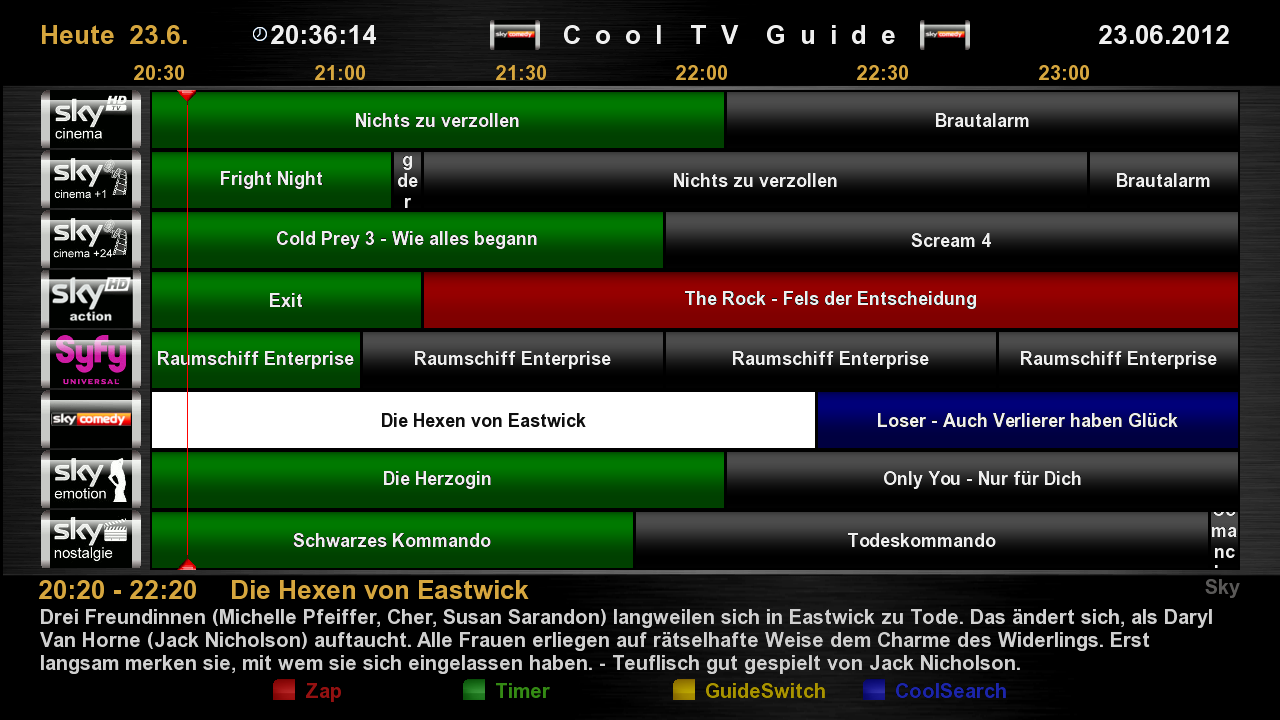
    grün = alle Sender die jetzt laufen
    hellblau = Sender der ausgewählt ist
    blau = alle Sender
    rot = Aufnahmen

    "Steuerkreuz"

    2 Seite hoch
    8 Seite runter
    4 Seite links
    6 Seite rechts

    auch switchen und Zappen auf Sender ohne EPG! (einstellbar)

    Steuerkreuz mit steppen, wie gewohnt

    Reset auf 5
    Fullreset auf 0

    1 Zoom hinein
    3 Zoom heraus
    7 Umschalten zwischen 4 Guides (einstellbar)
    9 Switch auf 20 Uhr
    < Tag - (Guide abhängig)
    > Tag + (Guide abhängig)

    rot = Zap (einstellbar)
    langrot = Zap+Exit (einstellbar)
    grün = Timer (einstellbar + editierbar)
    langgrün = Sendung automatisch zum Autotimer hinzufügen (einstellbar)
    gelb = CoolSwitch (einstellbar)
    langgelb = Bouquetliste (einstellbar)
    blau = CoolSearch Funktion (einstellbar)
    langblau = IMDb Search Funktion (einstellbar)
    OK = Cool Info Guide (einstellbar)
    langOK = (einstellbar)
    Rec = QuickRec
    kurzEPG/Info = Guide Select (zappen durch alle Guides)
    HELP = Anzeige aller Befehle
    Menu = Setup
    TV = Timer List
    Power = Ausschalt-Timer
    3D Ansicht / Standard Ansicht (auswählbar)

    /usr/lib/enigma2/python/Plugins/Extensions/CoolTVGuide/Cool3D/
    darin befinden sich 2 Ordner
    In "Standard" sind die Grafiken drin, die zu den bei CoolTV mitgelieferten Screens gehören
    In "MyDesign" kann jeder die Grafiken laden, die er gerne möchte (ist per Default leer)

    In "SkinDesign" kann der Skinner zu seinem Skin passende Grafiken reinpacken, daher gehört dieser Folder direkt in den Skin rein
    z.b. /usr/share/enigma2/BlackAlu-Coolman-Mod/SkinDesign/
    somit kann jetzt jeder seine EIGENE Optik und Buttons leicht selber machen

    Cool TV Guide, Cool Tiny Guide, Cool Multi Guide, Cool Nice Guide, Cool Info Guide, Cool Single Guide,
    Cool Easy Guide, CoolChannelGuide, CoolSearch und das Setup
    wurden in ein extra CoolSkin Ordner ausgelagert...
    somit könnt Ihr jetzt die Skinns ändern ohne neu zu starten

    Ausserdem habe ich Anmerkungen für die Skinner gemacht, damit Ihr es einfach einbauen könnt
    im Setup:

    Ihr könnt nun Eure Tasten selber belegen...
    da es hier ja nie eine Einigung gab

    die Höhe für Eure Picons einstellbar!
    somit könnt Ihr Eure Zellenhöhe und Rahmen selber bestimmen

    und Ihr könnt sogar die linken Abstände sowie die Anzahl Eurer Picons die Ihr sehen wollt einstellen!

    genause wie Picon ein und ausschalten!

    starte auf Kanal 1 (einstellbar)

    Primetime z.B. 20:15 (einstellbar)

    Fontgrösse, Spalten, Timeline sind alle einstellbar!

    sogar die CoolPico Größe kann geändert werden !

    Startansicht wählbar! einfach mit Coolswitch oder 7 auswählen was Ihr haben wollt..

    Anzeige des Bouquets im Skin

    wer Bouquets hat wird sich genauso über das Setup freuen...
    einstellbar ist auch die Bouquet Anzeige bei Start On/Off
    aber ich finde es ist praktischer sich seine Bouquets auf ein Button zu legen...
    da das Plugin sich sowieso die Position und das Bouquet merkt...

    super cool ist auch die CoolSearch Funktion...
    Sendung verpasst.. oder schon angefangen?
    kein Problem.. einfach den Blauen Button drücken und Ihr seht direkt wo eine Wiederholung läuft!!

    oder aber Ihr geht in das Cool Info Guide,
    dort habt Ihr das neue CoolSimilar
    das zeigt Euch für jede Sendung, ob es irgendwo nochmal gesendet wird

    wer seine Box an das Internet angeschlossen hat wird sich über IMDb oder TMDb freuen
    aber auch dazu müsst Ihr Euch noch das IMDb oder TMDb vom Feed laden...
    Cool Free Tuner:

    bei Aufnahmen werden nicht anwählbare Sender Grau

    Cool Timer Alarm !!!:

    diese Funktion ist nagelneu und hat kein anderes EPG
    es checkt Eure Timeraufnahmen...
    werden Aufnahmen durch den Sender verschoben, liegen aber noch in der Zeit ohne angeschnitten zu werden,
    dann bleibt die Aufnahme Rot
    wird die Aufnahme aber angeschnitten, dann wird die Anzeige Gelb !
    und es wird eine Popup Meldung mit Details gezeigt
    also wenn Ihr einmal eine Gelbe Aufnahme seht, dann wird es höchste Zeit diese zu überprüfen !


    viel Spass damit!!

    Anleitung:
    das ipk ins TMP kopieren und wie alle Plugins installieren...


    Achtung bei Probleme oder Crash:
    wenn Ihr nicht alle Infos in den EPGs seht, oder sogar einen crash bekommt...
    dann liegt das an einem nicht angepassten Skin !
    entweder Ihr benützt einen anderen Skin,
    oder ändert im FTP
    z.b. /usr/share/enigma2/EuerSkin/skin.xml
    darin findet Ihr mehrere
    <screen name="CoolTVGuide".........
    <screen name="CoolTinyGuide"........
    also für jede Ansicht normalerweise einen Eintag
    Cool TV Guide, Cool Tiny Guide, Cool Multi Guide, Cool Nice Guide, Cool Info Guide, Cool Single Guide,
    Cool Easy Guide, CoolChannelGuide, CoolSearch
    ändert das einfach ab in
    <screen name="xxxCoolTVGuide".........
    <screen name="xxxCoolTinyGuide"........
    dann sollte es laufen


    Code:
    Cool TV Guide V6.0 by Coolman
    Multilanguage
    
    for OE 1.6 and OE 2.0
    
    green = all stations now run
    light blue = channel is selected
    blue = all channels
    red = recording
    
    "Pad"
    
    2 page vertical
    8 page down
    4 left side
    6 page right
    
    also switchen and zapping channels without EPG! (Adjustable)
    
    Pad with quilting, as usual
    
    Reset to 5
    Full Reset to 0
    
    1 Zoom in
    3 Zoom out
    7 Switch 4 guides (adjustable)
    Switch 9 to 20 clock
    <Day - (Guide-dependent)
    > Day + (depending Guide)
    
    red = Zap (adjustable)
    Zap langrot = + Exit (adjustable)
    green = timer (adjustable + editable)
    = green for shipment to the car automatically add timers (adjustable)
    yellow = Cool Switch (adjustable)
    long yellow bouquet = list (set)
    Blue = Cool Search function (adjustable)
    long blue = Do Search function (adjustable)
    OK = Cool Info Guide (adjustable)
    langOK = (adjustable)
    Rec = QuickRec
    kurzEPG / User Guide = select (zap through all the guides)
    HELP = Display all commands
    Setup Menu =
    TV = Timer List
    = Power Off Timer
    3D View / Standard View (selectable)
    
    / Usr/lib/enigma2/python/Plugins/Extensions/CoolTVGuide/Cool3D /
    it has 2 folders
    In "Standard" and the graphics are there, they are one of the screens included in CoolTV
    In "MyDesign" anyone can download the graphics, which he would like (is empty by default)
    
    In "SkinDesign" Skinner can pack an appropriate graphics to his skin, so this is purely folder directly into the skin
    e.g. / Usr/share/enigma2/BlackAlu-Coolman-Mod/SkinDesign /
    so now everyone can make their OWN appearance and buttons easily yourself
    
    Cool TV Guide, Guide Tiny Cool, Cool Multi Guide Nice Guide Cool, Cool Info Guide, cool music guide
    Cool Easy Guide Channel Guide Cool, Cool Search and setup
    were stored in an extra CoolSkin folder ...
    Thus, you can now change the Skinns without restarting
    
    I also made notes for Skinner, so you can install it simply
    in the setup:
    
    You can now assign your own keys ...
    since there never was an agreement
    
    the amount of your picons adjustable!
    Thus you can define your own cell height and frame
    
    and you can even left the distances and the number of your picons see the set you want!
    
    genause as Picon on and off!
    
    start on channel 1 (adjustable)
    
    Primetime e.g. 20:15 (adjustable)
    
    Font size, columns, timeline are all set!
    
    CoolPico even the size can be changed!
    
    Selectable home screen! Simply select CoolSwitch or 7 have what you want ..
    
    Display of bouquets in the skin
    
    who has bouquets will be happy just with the setup ...
    set is also the bouquet display at startup On / Off
    But I think it is practical to put his bouquet on a button ...
    because the plugin anyway remembers the position and the bouquet ...
    
    super cool is the cool search function ...
    Broadcast missed .. or already started?
    no problem .. Just press the blue button press and you can see directly where a repeat run!
    
    or you go into the Cool Info Guide
    There you have the new CoolSimilar
    which shows you for each shipment, whether it is transmitted anywhere again
    
    who has joined his box to the Internet will be pleased with IMDb or TMDb
    But you must also help you or even to the IMDb TMDb load of feed ...
    Cool Free Tuner:
    
    when shots are not selectable transmitter gray
    
    Cool Timer Alarm!:
    
    This feature is brand new and has no other EPG
    It checks your timer recordings ...
    recordings are moved by the transmitter, but are still in time without having to be cut,
    then remains the recording Red
    But the recording is cut, then the display is yellow!
    and there will be a pop-up message with the details shown
    So even if you see a yellow uptake, then it is high time to check this!
    
    
    have fun with it!
    
    Instructions:
    copy the ipk to the TMP and how to install plugins ...
    
    
    Beware of problems or crash:
    if you do not see any info in the EPG, or even a crash gets ...
    it's because of a non-customized skin!
    You either used a different skin,
    or changes in the FTP
    e.g. / Usr/share/enigma2/EuerSkin/skin.xml
    You will find it more
    <Screenname = "CoolTVGuide" .........
    <Screenname = "CoolTinyGuide" ........
    Thus, for each view usually an entry from
    Cool TV Guide, Guide Tiny Cool, Cool Multi Guide Nice Guide Cool, Cool Info Guide, cool music guide
    Cool Easy Guide Channel Guide Cool, Cool Search
    changes from the simple to
    <Screenname = "xxxCoolTVGuide" .........
    <Screenname = "xxxCoolTinyGuide" ........
    then it should work


    Thx Coolman
    Attached Files Attached Files

  7. #16
    VIP Member fushkrujs's Avatar
    Join Date
    19-06-2009
    Posts
    3,015
    Uploads
    1,520
    Likes
    2,712

    Re: Cool TV Guide VU+

    UPDATE Cool TV Guide V6.0.1

    ein extra Dank an dieser Stelle für die Mithilfe und Anregungen an:
    Betonme
    Zombi
    Swiss-MAD
    Crypto90
    die auch Ihre Zeit geopfert haben um dieses Update zu verbessern !!

    Besonders an Crypto90, der mit mir die Website gecoded hat
    ---------------------------------------------------------------------------

    Hi,

    über 3000 Zeilen neuer Code
    über 2000 Zeilen Anpassungen
    9 neue Skinansichten (einstellbar)


    *new - jetzt für OE1.6 und OE2.0
    *new - CoolinfoBox (diese Infobox unterstützt extra Plugins(wenn installiert) wie zb. OFDb, TMDB, TVDB, IMDB und auch das neue SeriesPlugin fehlt da nicht)
    *new - Das Series Plugin bietet in der CoolinfoBox eine Besonderheit, denn man kann so für alle Events die im EPG stehen die SerienInfos abrufen und sieht welche Folgen zb. Morgen oder in 3 Tagen kommt

    Cool Channel Guide
    ----------------------
    *new - Cool Channel Guide (aufrufbar mit Pfeiltaste nach unten)
    *new - Cool Channel Guide hat 3 wählbare skins (wählbar mit Tasten 1,2 und 3)
    *new - Markeranzeige sowie Marker anspringen (mit den Tasten 4 und 6 ) möglich (alles skinbar)
    *new - man kann mit den < > Tasten den kompletten EPG des Senders durchsteppen
    *new - skinbarer Abstand Service - Event im CoolChannel Guide
    *new - Anzeige von % für die schon abgelaufene Sendezeit (im Skin einstelbar CoolTime="1" )
    *new - Anzeige von +20 für die noch verbleibende Sendezeit in min (im skin einstelbar CoolTime="0")
    *new - NextEvent (bis zu 5 NextEvent anzeigen skinbar)
    *new - alle Funktionen des Cool TV Guide sind mit dem Cool Channel Guide abrufbar sowie untereinander abgestimmt
    *new - Anzeige von Picons oder kleine CoolPico
    *new - mehrzeilige Anzeige möglich
    *new - Cool Channel Guide Advanced Option (abrufbar mit der PVR Taste) ermöglicht Euch die Navigation zu (Favourites,Providers,Satellites,All Sevice)

    Cool Easy Guide
    ----------------------
    *new - Cool Easy Guide hat jetzt 3 wählbare Skins (wählbar mit Tasten 1,2 und 3)
    *new - "Achtung für Skinner" Cool Uni Guide gibt es nicht mehr unter diesen Namen. Ihr könnt diesen einfach umbenenen in CoolEasyGuide2 oder CoolEasyGuide3

    Cool Single Guide
    ----------------------
    *new - Cool Single Guide hat jetzt 3 wählbare Skins (wählbar mit Tasten 1,2 und 3)


    viel Spass!!


    Code:
    UPDATE Cool TV Guide V6.0.1
    
    an extra thanks to them for their assistance and suggestions to:
    Betonme
    Zombi
    Swiss-MAD
    Crypto90
    which also have sacrificed your time to improve this update!
    
    Especially on Crypto90 who gecoded with my website
    -------------------------------------------------- -------------------------
    
    Hi,
    
    about 3000 lines of new code
    about 2000 lines of adjustments
    9 new Skinansichten (adjustable)
    
    
    * New - and now for OE1.6 OE2.0
    * New - CoolinfoBox (. This info box supports extra-plugins (if installed) such as eg advertisement advertisement, TMDB, tvdb, IMDB plugin and the new series is no shortage there)
    * New - The Series provides plug-in CoolinfoBox a specialty, because we can thus obtain for all events in the EPG are about the series and sees the consequences eg. Morning comes, or in 3 days
    
    Cool Channel Guide
    ----------------------
    * New - Cool Channel Guide (via a down arrow key)
    * New - Cool Channel Guide has 3 selectable skins (selectable with buttons 1,2 and 3)
    * New - start marker and marker display (everything skinable) (with the keys 4 and 6) possible
    * New - you can sew through the <> buttons to complete the station EPG
    * New - skinbarer distance service - event in Cool Channel Guide
    * New - display of% for the already elapsed transmission time (in the skin be adjusted as Cool Time = "1")
    * New - display of +20 for the remaining air time in minutes (in the skin be adjusted as Cool time = "0")
    * New - Next Event (up to 5 Show Next Event skinable)
    * New - all the features of the Cool TV Guide Channel are the Cool Guide available and in a coordinated manner
    * New - display of picons or small CoolPico
    * New - multi-line display possible
    * New - Cool Channel Guide Advanced Option (available with the PVR key) allows you to navigate to (Favourites, provider, Satellites, All Sevice)
    
    Cool Easy Guide
    ----------------------
    * New - Cool Easy Guide now has 3 selectable skins (selectable with buttons 1,2 and 3)
    * New - "respect for Skinner" Cool Uni guide, there is no longer under that name. You can use this simple Renaming or in CoolEasyGuide2 CoolEasyGuide3
    
    Cool music guide
    ----------------------
    * New - Cool music guide now has 3 selectable skins (selectable with buttons 1,2 and 3)

    Thx Coolman
    Attached Files Attached Files

  8. #17
    VIP Member fushkrujs's Avatar
    Join Date
    19-06-2009
    Posts
    3,015
    Uploads
    1,520
    Likes
    2,712

    Re: Cool TV Guide VU+

    Cool TV Guide V6.0.5


    Thx Coolman
    Attached Files Attached Files

  9. #18
    VIP Member fushkrujs's Avatar
    Join Date
    19-06-2009
    Posts
    3,015
    Uploads
    1,520
    Likes
    2,712

    Re: Cool TV Guide VU+

    Update Cool TV Guide 6.1.0


    Hi,

    alle gemeldeten Bugs sollten behoben sein...

    ausserdem wurde an vielen Stellen vom Code optimiert,
    dadurch laufen nun manche Teile viel flüssiger...

    z.b. Bouquet wechsel, hoch runter steppen sollten nun auch schneller sein...

    viel Spass

    Thx Coolman

Page 2 of 2 FirstFirst 12
Advertise Here

Similar Threads

  1. cool!
    By bart.simpson in forum Introductions
    Replies: 0
    Last Post: 10-01-2009, 19:34:54
  2. hlp with cool sat 5000 plzz
    By FnDave in forum English (UK)
    Replies: 2
    Last Post: 05-08-2006, 07:33:03

Posting Permissions

  • You may not post new threads
  • You may not post replies
  • You may not post attachments
  • You may not edit your posts
  •