Advertise Here
Advertise Here
Advertise Here
Advertise Here
Page 9 of 18 FirstFirst ... 4789101114 ... LastLast
Results 81 to 90 of 176

Thread: Backups image for Vuo+Duo

  1. #81
    VIP Member aguda's Avatar
    Join Date
    09-12-2007
    Posts
    10,437
    Uploads
    2,875
    Likes
    308

    Re: VTi V 2.2"Vu+Duo Team Image" Sat4fun's Hispasat Ready Back Up 20.11.2010

    Nemesis 2.2 Vu+duo Back up by isayuksel

    Code:
    First of all, the latest version of the new image to the usb (Vu + duo Nemesis 2.2) cihazımıza download and install subject matter: (1) Vu + Duo USB with the image and build
    
    After installation to be done after the installation settings:: (2) Vu + Duo first setup settings
    
    
    Seçilidi HDMI.
    1080i is selected.
    DHCP on the network.
    
    Turkish Language Support is installed in this version of the image as a gelemektedir. To use the Addons Manager in Turkish with this cause (This section to reach the short-term pressing the blue key twice) to come on the packet management kumandamızın the OK button.
    Drop-down list;
    enigma2-locale-en
    Enigma2 Language Pack en
    
    While launching the installation by pressing the OK button and find the Kumandamızın.
    
    Menu> Setup> System> Turkish Language to select the section to come.
    
    At the point where you can search the channel or canal Stock List can install this. If you want to call before you'll need to channel tuner settings.
    
    For this review the following issue: (4) Vu + channel search and the favorite of creating Duo
    
    We check the setting network.
    
    Menu> Setup> System> Network in the "Network hardware settings" kumandamızın point to the "OK" button.
    
    Under the section for the current settings by getting the IP address of shout. (Channel settings when you install will have to get back the value of the rope.)
    
    If the link I gave about the problem, review the network setup issue: Vu + wired / wireless network setup and test procedure
    
    Channel Setting install:
    
    List of Channel 4 with a different method to throw (Contacts).
    
    
    Setting the DUO VU + {10} 27.Mart.2011 satellite Kayacan * Channel settings loaded.
    
    Do not forget to reboot after installing the device channel settings.
    
    Menu> Setup> Satellite configuration> Tuner Tuner settings: Settings section to come.
    
    Tuner A: (simple) DiSEq A / B / C / D: 42 ° / 13 / ° 7 ° / 19.2 °
    Tuner B: (advanced) DisegC 1.1: 42 ° / 13 / ° 7 ° / 19.2 ° / 39 ° / 9 ° / 4.8 ° / 16 °
    
    Note: Notice that before the channel ayarlamızı made our list after you install the tuner. Thus, due to the possible setting names of different satellites have prevented errors in the satellite broadcasting can be taken.
    
    Menu => Add-ons => Red Key (the Manage Add-ons), a pressed.
    Updating the software catalog. Updates the control ediliyor.Lütfen wait ... Plug-ins will be seen after a period of warning in case of Categories.
    
    Extension Manager => under the system established under the PermanentClock. Set.
    Extension Manager => under the system established under the SetPasswd. Root password: vuduo
    Extension Manager => under the system established under the StartUpSefvice.
    Extension Manager => software under the under the VlcPlayer established.
    Extension Manager => software under the under the VlcPlayer established.
    Extension Manager => Multi-media was founded under the AutoResolution below.
    Extension Manager => Multi-media was founded under the MyTube below.
    Extension Manager => Multi-media was founded under the PicturePlayer below.
    Extension Manager => Multi-media was founded under the SimpleRSS below. Set.
    Extension Manager => Multi-media was founded under the VirtualZap below. Press and hold the arrow
    Extension Manager => under Multimedia WeatherPlugin kuruldu.Ayarlanmadı under.
    Extension Manager => Multi-media was founded under the YoutubePlayer below.
    
    Installations will want to start from again. Yes, with the device to restart.
    
    Time Zone: (GMT +02:00) Athens, Istanbul, Minsk
    set as the startup service: Kanal D
    
    Primarily for the installation of Emu
    
    tunisiasat-addons-manager_3.0 via ftp download / tmp folder are sending.
    
    Addons Manager, at (this section twice to reach the short-term pressing the blue button) pointing to the Manual Install Package kumandamızın the OK button.
    
    Here, the file by seeing (while on) are doing the installation by pressing the arrow key.
    
    After you restart the device to the Menu> Add-ons> TunisiaSat manager3.0 from EDG-Nemesis addons do the installation.
    
    Addons Manager at
    
    Download Extra will find the option.
    
    Download the extra point to pressing the OK button kumandamızın
    click on üzeirne e2Emu come.
    2.2.1 cccam the OK button.
    
    
    CCcam 2.2.1 Established | Established 1.3.5a Mgcamd | Bulsat Patch For File loaded.
    Patch File for Bulsat Load:
    Patched by pinkyto0o would remove enigma2 Bulsatcom mgcamd_1.35a download and unzip. Unzip the folder in the extracted
    mgcamd_1.35a file via ftp / usr / bin under the taking (on the print the other one)
    making the value of chmod 755.
    
    Hacksat-Keys-downloader-e2_1.1-30102010_mipsel.rar download and update k.ey do.
    To set up Hacksat telnette
    First
    
    ipkg update
    
    then
    
    Export MALLOC_CHECK_ = 0
    ipkg install-force-overwrite / tmp / Hacksat *
    
    give the command.
    
    Menu => Add-ons => tunisiasat-addons-manager_3.0 tunisiasat plugins to come in here, "Netradioturk_2.5" and "LiveFootbal" was established
    
    
    WebMedia plugin was downloaded. (@ Niendorfer)


    3.0.2 Subtitleplayer was founded ..
    DOWNLOAD USB IMAGE

  2. Advertise Here
  3. #82
    Banned
    Join Date
    30-06-2005
    Location
    Kukes,Albania
    Posts
    4,252
    Uploads
    3,558
    Likes
    40

    Re: Backups image for Vuo+Duo

    Meoboot Backup Images Nemesis 2.2 @ozkaradag
    Code:
    Greetings,
    
    This backup works only Meoboot'ta.
    
    How to do it?
    -------------------------------
    FTP to download the Zip file to remove the / media / hdd / MbootB sending folder.
    Add-in tools to come MeoBoot (Blue)> Manage file by selecting the Restore Backups'dan (red), or install and select.
    
    A mishap happens and you like the images are modified in this way I'll give.
    And I hope for forgiveness in advance for mistakes.
    
    SETTINGS:
    --------------------------------
    A. Tuner 4lü disecq: Turksat / Hotbird / Eutelsat W3 / Astra 19e (if they wish to set up their own equipment.)
    B. Tuner Empty.
    
    Channel list: Galaxy2002
    
    Opening Channel: Star TV
    
    Audio / Video:
    HDMI.
    720p.
    multi.
    Pillarbox.
    Just Scale.
    Other standard things.
    
    Image Enhancement:
    All standard.
    
    Otoçözünürlük: (passive case, you can activate when you want.)
    All SD'lerin 576p.
    Interlace 1080i HD.
    HD 720p default.
    Other standard.
    
    Language: Turkish.
    
    Customize:
    Record the beginning and the end of the additional 5min.
    Bouquet Multi-Usage: Yes.
    Bouquets from the transition: No.
    Alternative Radio mode: Yes.
    Information bar waiting: 6sn.
    
    Time Zone: Istanbul, Turkey.
    
    Network: DHCP.
    
    OLED Setup:
    Brightness: Latest.
    Brightness on vision: 40%
    Hibernate: Min.
    
    Interface:
    HDGlass 15 (its interface)
    
    Root password: vuplus
    
    Hibernate Bekletmedeki Fan Status:
    On 20 minutes.
    1min break.
    
    WebArayüz security: Yes.
    
    Videotune: Removed.
    
    Additives:
    --------------------------------
    Dyndns.
    CCcaminfo.
    Multi-Mediathek 3.0 (Adult sites are closed.).
    Transmission.
    Bi-Hacksat pp. (Güncellendi.)
    D-Explorer.
    RSS Reader.
    Turk NetRadio 2.5
    LiveFootball 1.2
    Enhanced Movie Center.
    3:05 DDamir Subtitle
    TunisiaSat Addons Manager 3.0
    I did not write the image and plug-ins.
    
    
    EMULAR:
    ----------------------------------
    CCcam 2.2.1 (/ etc / Restore orig CCcam.cfg installed, you can modify according to your own.)
    Scam 3.60
    MGCamd 1.35a
    Oscam + CCcam 2.2.1
    Oscam


  4. #83
    VIP Member Andushi's Avatar
    Join Date
    13-04-2010
    Location
    United Nations
    Posts
    4,103
    Uploads
    2,275
    Likes
    29

    Re: Backups image for Vuo+Duo

    Backup BH 1,6-by zegarion

    Backup BH 1,6-by zegarion Czyli Cccam i MgCamd , pluginy spolszczenia i feedy z innych image, dostosowane pod Polskiego Użytkownika...
    Lista Tornado99 ze zmianami moimi oraz na orbicie :).
    Czyli wszystko w jednym ...


    BH_16.nfi

    BH_16_USB.zip

  5. #84
    VIP Member Andushi's Avatar
    Join Date
    13-04-2010
    Location
    United Nations
    Posts
    4,103
    Uploads
    2,275
    Likes
    29

    Re: Backups image for Vuo+Duo

    BlackHole Vu+ Duo v. 1.6 - Graphics preview (memo-can1967) backup

    Code:
    - bootlogo changed (I prepared myself)
    - Tuner A DiSEq A / B türksat42/hotbird13
    - Uploaded on May 6 channel master Galaxy2002 seting
    - Tuner B set
    - channel opening set D
    - CCcam 2.2.1
    - Established Mgcamd ..
    - Patch file is loaded for B*****
    - Gbox225_E2_bh
    - Mgcamd_135 + newcs167_E2_bh
    - Sbox0047-4 + CCcam213_E2_bh
    - Hacksat loaded ...
    - Uploaded Multimediathek ..
    - Subtitle Player is loaded
    - weather plugin installed
    - TunisiaSatAddOnManager loaded.
    - Added RSS
    - nStream player installed ..
    - Uploaded picon / 42 / 13
    USB

    NFI

  6. #85
    VIP Member aguda's Avatar
    Join Date
    09-12-2007
    Posts
    10,437
    Uploads
    2,875
    Likes
    308

    Re: Backups image for Vuo+Duo

    OpenPli_V2_Volar Black+Miistick+WintvNova-T (09-05-11 UPDATE

    Code:
    New OpenPli_V2_Volar Miistick + Black + WintvNova-T (05/09/1911) Upgradeable
    Sorry for the absence, I have to make the little work there.
    
    Because I worked the Black Fly TDT which is what most have, I did some tweaking and set everything to the new structures for which we work.
    
    Can operate 2 or 3 USB DTT at a time (although I think it silly, but who knows).
    
    100% Open-Kernel Pli
    
    TDT-USB Drivers (TodoDream, sifteam, OpenPli)
    
    "The one you upload is ready to fly Black + Ministick (the DOAS at a time or independent) (I could not try the WinTV Nova T + some more of the other Freeview or alone), and comentareis.
    
    "You need not download anything for the TDT, just connect and start the VU.
    
    -Upgradeable without losing anything.
    
    Crosepg with built-crack pluging sergiotas (required in the D + ARE favorite channels "PAGE), if you pass are the satellites of the list of the favorites of D +.
    
    "The crosEpg what configurais in Menu-Settings-CrosEgp and manually download it first: Menu-plugins-CrosEpg (now you have it configured to run the daily sergiotas pluging to 4 am)
    Know that pluging sergiotas weekly downloads the epg transponder and also passes the epg also to HD channels (great job).
    
    "CCcam 2.1.3
    
    -Place your config in / etc /
    
    "In plugins you have more emus.
    
    "In the PPanel you have several utilidaes and information from the VU (blue button-PPanel)
    
    -Fixed-nan (infobar us in the ECM time)
    
    "If conectais two USB Freeview, you know that you can record one Freeview channel and watch or record another of DTT, in addition to the SAT,
    I did try recording two plus two of tdt sat at the same time and without problems.
    
    -Recognizes but not hear the sound AC3 +.
    
    -Configure your IP, canals, etc.,
    Remember to run the weekly epg sergiotas, it should be the favorite channels D + "HOME."
    
    "To find channels of DTT DTT Tuners configurais the frequencies of europe ,......., T, that is enough to find the Spanish channels, are all frequencies.
    
    "Tested only on the flash, I'm uploading this to flash and NFI.
    
    I hope you go well at least the usb-tdt that I comment,
    
    They enjoy it, I do not have more time.
    
    Greetings
    
    NOTE: This backup does not contain any keys, or anything prohibited by law, the emus are legal to read our target.
    THX javier3034


    DOWNLOAD USB

    DOWNLOAD NFI

  7. #86
    VIP Member aguda's Avatar
    Join Date
    09-12-2007
    Posts
    10,437
    Uploads
    2,875
    Likes
    308

    Re: VTi V 2.2"Vu+Duo Team Image" Sat4fun's Hispasat Ready Back Up 20.11.2010

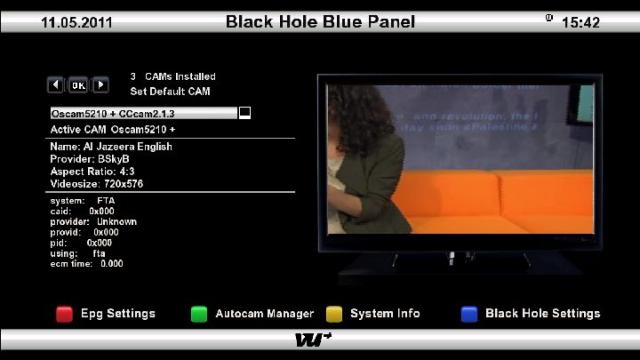
    [CENTER] Sly uk ready BlackHole Vu+ Duo v. 1.6 - Backup


    Button Mappings

    OK button = Skin with simple information
    OK button x 2 = Extra Info Skin
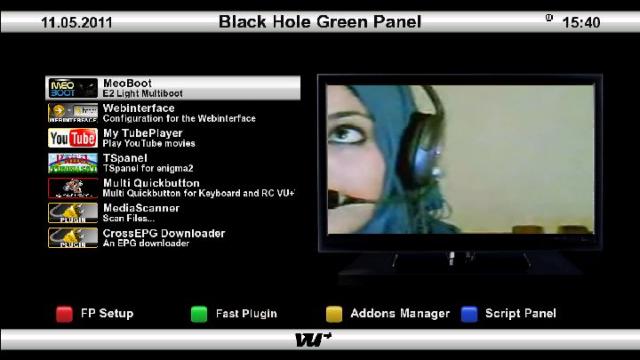
    Blue button = Black Hole Blue Panel
    Blue button and then Red button = Black Hole Epg Panel
    Blue button and then Yellow button = System Monitor Panel
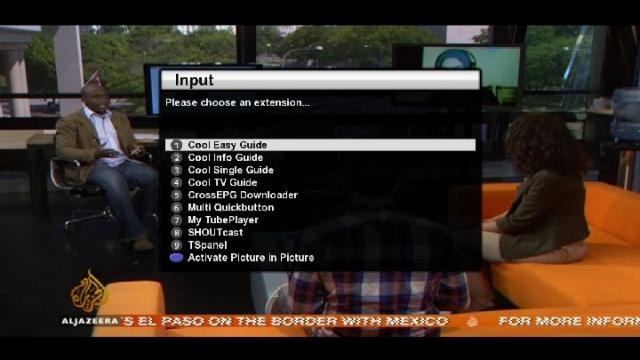
    Blue button long press = Extensions
    Yellow button = Time Shift
    Green button = Black Hole Green Panel
    Green button long press = Subservices
    Green button and then Red button = Fast Plugin Setup
    Green button x 2 = Fast Plugin
    Button Red = Start Record

    Addons

    Green button and then Yellow button takes you to:-
    Dedicated server for BlackHole addons
    Download and install additional packages from the Black Hole server


    Whats New ?

    This image is Sly uk ready with Oscam and N line in CCcam.cfg for updating entitlements.
    CCcam 2.1.4
    CCcam 2.1.3
    Oscam 5210 ( thanks to new2linux for the start/stop script )
    Latest CCcam Channel info
    Latest CCcam Providers
    SGTFlipFlop ENiGMA2 07.05.11 (Multi)
    SGTFlipFlop ENiGMA2 07.05.11 Picons (usr/share/enigma2)
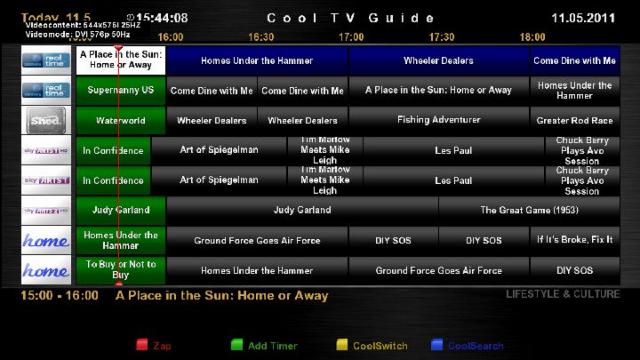
    Cooltvguide Coolman V3.0 ( setup for Red button )
    Shoutcast
    tspanel 1.4
    Multi Quickbutton
    Cron reboot set for 08.00

    Screenshots


    PASSWORD:
    vuplus


    Enjoy
    Linuxsat-support Team

    USB
    Code:
    	http://www.multiupload.com/QLEIRWCSYY

  8. #87
    VIP Member aguda's Avatar
    Join Date
    09-12-2007
    Posts
    10,437
    Uploads
    2,875
    Likes
    308

    Re: VTi V 2.2"Vu+Duo Team Image" Sat4fun's Hispasat Ready Back Up 20.11.2010

    BlackHole Vu+ Duo v. 1.6.1 - Personal Backup(memo-can1967 Backup)
    • Bootlogo Changed
    • Tuner A DiSEq A / B türksat42/sıcak kuşak/13
    • Galaxy2002 master channel seting Uploaded on May 19 (42/13)
    • Tuner B set
    • HD set opening channel TRT
    • CCcam 2.2.1 was
    • Established Mgcamd ..
    • Patch file is loaded for B*****
    • Gbox225_E2_bh
    • Mgcamd_135 + newcs167_E2_bh
    • Sbox0047-4 + CCcam213_E2_bh
    • Hacksat loaded ...
    • Uploaded Webmedia
    • Subtitle Player is loaded
    • weather plugin (the green button is pressed long) loaded
    • TunisiaSatAddOnManager loaded.
    • Added RSS (adjusted)
    • nStream player installed ..
    • Picon loaded HD 42/13
    • Merlin loaded music player ..
    • Uploaded media sentir
    • degiçti radio picture
    • Installed LiveFootball ..
    • berlin music player is loaded
    • Uploaded on google Wapse
    • Exporer drama loaded (copy the files to move)

    USB Version

    NFI VERSION

  9. #88
    New Member
    Join Date
    29-09-2010
    Posts
    8
    Uploads
    0
    Likes
    0

    Re: VTi V 2.2"Vu+Duo Team Image" Sat4fun's Hispasat Ready Back Up 20.11.2010

    BKP Pappaalfio Nemesis SVN79 "Butterfly" for Vuduo


    Info:
    Release (SVN79) STABLE - 06/05/2011

    Network :
    user root - passwd vuduo
    ip 192.168.1.8 - 255.255.255.0

    Skin:
    Vali HD

    Plugin:
    Setting Loader
    LCN
    CrossEpg
    EasyMedia
    EpgSearch
    GSU Light
    3Cinfo
    Cronmanager
    IalyDTTDownloader
    Media Scanner
    SyncLips
    WebInterface

    warning: last field of plugin SettingLoader don't work ,will be fixed soon

    Setting:
    Morpheus 13/19


    LINK USB

    LINK NFI

  10. #89
    VIP Member aguda's Avatar
    Join Date
    09-12-2007
    Posts
    10,437
    Uploads
    2,875
    Likes
    308

    Re: VTi V 2.2"Vu+Duo Team Image" Sat4fun's Hispasat Ready Back Up 20.11.2010

    Enigma 2 VX nun auch für die VU+ Duo

    Release 16.05.2011

    * Power-Board-Center mit Mountmanager
    * neues Cam-Management
    * OneKeyHD Skin thx to ravadi
    * Backup-Manager, Addon-Management, Spaceviewer, Crypt-Anzeige, ... uvm.


    Download NFI-Image

    Code:
    http://www.sendspace.com/file/td4enl
    Download USB-Image

    Code:
    http://www.sendspace.com/file/01cabx

  11. #90
    VIP Member aguda's Avatar
    Join Date
    09-12-2007
    Posts
    10,437
    Uploads
    2,875
    Likes
    308

    Re: VTi V 2.2"Vu+Duo Team Image" Sat4fun's Hispasat Ready Back Up 20.11.2010


Page 9 of 18 FirstFirst ... 4789101114 ... LastLast
Advertise Here

Similar Threads

  1. VU+E2 Image 2.0 for DM8000(mbox image)
    By aguda in forum Dreambox DM 8000 HD PVR Images
    Replies: 0
    Last Post: 09-01-2010, 00:53:09
  2. image
    By eskiyaaslan in forum German / Deutsch
    Replies: 0
    Last Post: 14-08-2009, 00:36:44
  3. Backups DM-500
    By totox69 in forum Dreambox DM 500 / DM 500+ Images
    Replies: 0
    Last Post: 15-09-2008, 10:00:35
  4. backups 500s
    By goodtrick in forum Dreambox
    Replies: 0
    Last Post: 11-09-2008, 11:04:10

Posting Permissions

  • You may not post new threads
  • You may not post replies
  • You may not post attachments
  • You may not edit your posts
  •