Advertise Here
Advertise Here
Advertise Here
Advertise Here
Page 10 of 18 FirstFirst ... 58910111215 ... LastLast
Results 91 to 100 of 176

Thread: Backups image for Vuo+Duo

  1. #91
    VIP Member aguda's Avatar
    Join Date
    09-12-2007
    Posts
    10,437
    Uploads
    2,875
    Likes
    308

    Re: VTi V 2.2"Vu+Duo Team Image" Sat4fun's Hispasat Ready Back Up 20.11.2010

    backup BlackHole Vu+ Duo 1.6.2 by fandos

    os dejo lo ultima black hole 1.6.2
    contenido:
    drivers tdt usb wintv ministick
    terrestrial español
    lista de canales multisat
    tuner a:motor
    tuner b:fija lnb monoblock hotbird astra
    pluguins:
    livefootball 1.2
    cccam info bh
    mhw2epgdownloader:epg 7 dias sd y hd
    skins:
    el que trae de origen la imagen
    varios:
    cccam 221 full
    cccam providers
    cccam chanel info.
    no tiene pass la imagen
    y por fin se olle tve1 hd

    http://www.multiupload.com/5GJN9LPIYM

    saludos.

  2. Advertise Here
  3. #92
    Member a911's Avatar
    Join Date
    26-10-2009
    Posts
    27
    Uploads
    1
    Likes
    2

    Re: VTi V 2.2"Vu+Duo Team Image" Sat4fun's Hispasat Ready Back Up 20.11.2010

    Thanx aguda,

    will give it test run (BH Image BKUP)!


    Rgdz
    a911

  4. #93
    VIP Member aguda's Avatar
    Join Date
    09-12-2007
    Posts
    10,437
    Uploads
    2,875
    Likes
    308

    Re: VTi V 2.2"Vu+Duo Team Image" Sat4fun's Hispasat Ready Back Up 20.11.2010

    BlackHole Vu+ Duo v. 1.6.1 Full Motor BackUP By Ferret


    Image Based On BlackHole Vu+ Duo v. 1.6.1


    Mods


    var/keys & var/scce added to boot file to help mgcamd with key use ;)


    Smargo activated in kernel.


    CCcam nan ecm fix applied.


    Emus Added

    Mgcamd 1.35a patched and configured just add keys.


    CCcam 2.2.1


    CCcam 2.1.3


    Plugins/Addons


    CCcam Info 1.3

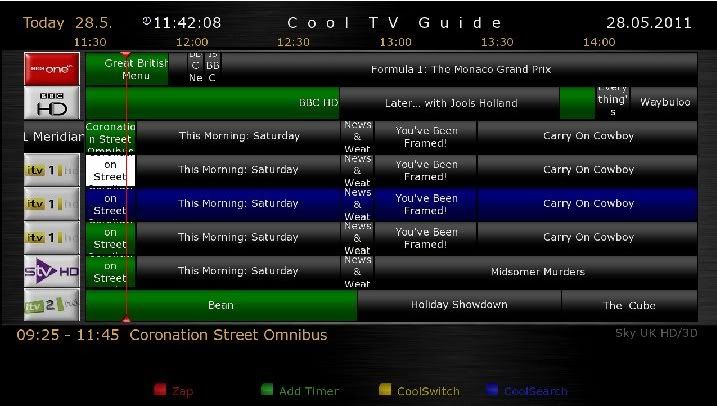
    Cool Mans TV Guide Setup to work with EPGs Configured.
    Picon Path /media/usb/picons


    Channel Settings


    Catseye Full Motor 20/05/11


    EPG's Setup


    Providing you have a mounted USB pen drive the following EPG's are setup. If you dont have a pen drive disable the scheduled downloads on the EPG panel. Insert your USB pen in slot below ethernet port. Mapped to /media/usb


    Rytec Nordic


    Satmate Sky Italia


    Satmate Sky UK


    Enjoy

    Pass for image = ferret

    USB

    Blackhole1.6.1-VUDuo-Full Motor BackUP-ByFerret-USB

    NFI

    Blackhole1.6.1 -VUDuo-Full Motor BackUP-ByFerret-NFI

  5. #94
    VIP Member fushkrujs's Avatar
    Join Date
    19-06-2009
    Posts
    3,015
    Uploads
    1,520
    Likes
    2,713

    Backup: Black Hole VuDuo 1.6.2 Beta Dolby Digital Plus & Subtitles Fix by Comadreja


    TVE HD Woirking ..................

    New Exclusive Bootlogo by elgeneral For this Backup
    Drivers TDT Aver Volar Green HD
    Terrestrial Xml TDT Spain
    Sbox+Cccam 2.2.1
    Sbox Latest versión
    Cccam 2.2.1
    Mgcamd 1.35a
    Cccam Info 1.3
    Picons Kanalreference HD by Licher update to 09.05.2011
    Tunisia Sat Addons Manager
    Sat angels Key Updater
    BH Script Backup USB

    Tuner A:
    Settings Dual Hotbird 13ºE/ Astra 19,2ºE by Cyrus update to 21/05/2011

    Tuner B:
    Not configure

    Tuner C:
    TDT Spain channels (TVE HD Okey)

    Code:
    Added Folder duo (media/duo), for HDD on red with PC.
    
    For working edit fstab en /etc
    
    //192.168.1.128/duo /media/duo/ cifs username=user,password=pass rw 0 0 0 0
    
    edit with your ip
    
    Again connect for telnet and write:
    
    mount -t cifs -o username=user,password=pass //192.168.1.128/duo /media/duo
    
    edit with your ip
    
    Reboot your VU+duo. (Working with Xp OS)

    USB File Download:
    http://www.multiupload.com/YI0MQSO5NM

    NFI File Download:
    http://www.multiupload.com/8P3F6II159

  6. #95
    VIP Member aguda's Avatar
    Join Date
    09-12-2007
    Posts
    10,437
    Uploads
    2,875
    Likes
    308

    Re: VTi V 2.2"Vu+Duo Team Image" Sat4fun's Hispasat Ready Back Up 20.11.2010

    Official Image Backup 5.9 @ isayuksel

    First, a new image to the usb install the latest version of cihazımıza: (1) Vu + Duo USB with the image and build
    After the setup wizard after installing the software is present. At this stage I am only language choice. Other transactions without getting out of the wizard.
    Quote:


    Turkish language was chosen.

    We check the setting network.

    Menu> Setup> System> Network in the "Network hardware settings" kumandamızın point to the "OK" button.
    User Interface: yes
    Use DHCP: yes

    We take the IP address of the shout section of the current settings.

    If the link I gave about the problem, review the network setup issue: Vu + wired / wireless network setup and test procedure

    I need to do some adjustments in order to install the Channel List.

    Menu => System => Customize in the user experience, "expert" as a change. Yet at the same place;
    (Menu => System => Customize section) to enable the use of multi-bouquet "yes" as a change. Kumandamızın Green Button to save the changes (OK) are pressed.

    However, the channel setting, install, and we can do with the computer for other tasks "webinterface" plugin must establish.

    For this
    Menu => Add-ons => Green Button (Download Extension) a pressed.
    Extension information indiriliyor.Lütfen wait ... Plug-ins will be seen after a period of warning in case of Categories.

    Here, under the extensions section "webinterface" plugin point kumandamızın the OK button. "Extensions-webinterface" Do you want to download the plug-in? will come in the form of a message. kumandamızın yes on the option while the "OK" button.

    "Practice is over," which was written by kumandamızın are going to exit key.


    Now you can install Settingimizi Channel: 4 Channel with a different method throw list (Contacts).

    Menu> Setup> Satellite configuration> Tuner Tuner settings: Settings section to come.

    Tuner A: (simple), Not Set, set the way you want.
    Tuner B: (advanced) DisegC 1.1: 42 ° / 13 / ° 7 ° / 23.5 ° / 39 ° / 9 ° / 4.8 ° / 16 °

    DOWNLOAD USB

    DOWNLOAD NFI

  7. #96
    VIP Member aguda's Avatar
    Join Date
    09-12-2007
    Posts
    10,437
    Uploads
    2,875
    Likes
    308

    Re: VTi V 2.2"Vu+Duo Team Image" Sat4fun's Hispasat Ready Back Up 20.11.2010

    Nuevo Backup Black Hole Vu+ Duo 1.6.2 Final by Comadreja

    DHCP On to run
    Settings Dual Hotbird 13/Astra 19 by Cyrus settings team update to 29.05.2011
    Terrestrial Xml for TDT Spain update
    Picons By Lichers
    TS Panel 2.0 New Tunissia Addons Manager
    Sbox + Cccam 2.2.1
    Cccam 2.2.1
    Mgcamd 1.35 + config
    Sbox Lastest version
    Cccam Providers update to 01.06.2011
    Cccam Channel Info update to 01.06.2011

    Screenshots:


    Nuevo Backup Black Hole Vu+ Duo 1.6.2 Final by Comadreja USB

    Nuevo Backup Black Hole Vu+ Duo 1.6.2 Final by Comadreja NFI

  8. #97
    VIP Member aguda's Avatar
    Join Date
    09-12-2007
    Posts
    10,437
    Uploads
    2,875
    Likes
    308

    Re: VTi V 2.2"Vu+Duo Team Image" Sat4fun's Hispasat Ready Back Up 20.11.2010

    contenido:
    drivers tdt usb wintv ministick
    terrestrial español
    lista de canales multisat
    tuner a:motor
    tuner b:fija lnb monoblock hotbird astra
    pluguins:
    livefootball 1.2
    cccam info bh
    mhw2epgdownloader:epg 7 dias sd y hd
    skins:
    el que trae de origen la imagen
    varios:
    cccam 221 full
    cccam providers
    cccam chanel info
    pass:dreambox
    http://www.multiupload.com/BZF99XTX7K
    saludos.

  9. #98
    VIP Member aguda's Avatar
    Join Date
    09-12-2007
    Posts
    10,437
    Uploads
    2,875
    Likes
    308

    Re: VTi V 2.2"Vu+Duo Team Image" Sat4fun's Hispasat Ready Back Up 20.11.2010

    Sly uk ready Black Hole Vu+ Duo 1.6.2 Final backup


    Button Mappings

    OK button = Skin with simple information
    OK button x 2 = Extra Info Skin
    Blue button = Black Hole Blue Panel
    Blue button and then Red button = Black Hole Epg Panel
    Blue button and then Yellow button = System Monitor Panel
    Blue button long press = Extensions
    Yellow button = Time Shift
    Green button = Black Hole Green Panel
    Green button long press = Subservices
    Green button and then Red button = Fast Plugin Setup
    Green button x 2 = Fast Plugin
    Button Red = Start Record

    Addons

    Green button and then Yellow button takes you to:-
    Dedicated server for BlackHole addons
    Download and install additional packages from the Black Hole server


    Whats New ?

    This image is sly uk ready with Oscam and N line in CCcam.cfg for updating entitlements.
    CCcam 2.1.4
    CCcam 2.1.3 + Oscam 5352 ( thanks newtolinux for the start stop script )
    CCcam Providers update to 01.06.2011
    CCcam Channel Info update to 02.06.2011
    SGTFlipFlop ENiGMA2 22.05.11 (Multi)
    SGTFlipFlop ENiGMA2 22.05.11 Picons (usr/share/enigma2)
    Cooltvguide Coolman V3.0.0
    Shoutcast
    Glass system utility 3.39
    Multi Quickbutton

    Screenshots


    PASSWORD:
    vuplus

    NFI download

    USB download

  10. #99
    VIP Member aguda's Avatar
    Join Date
    09-12-2007
    Posts
    10,437
    Uploads
    2,875
    Likes
    308

    Re: VTi V 2.2"Vu+Duo Team Image" Sat4fun's Hispasat Ready Back Up 20.11.2010

    Code:
    NOTICE This backup works only Meoboot'ta!
    
    How to do it?
    -------------------------------
    FTP to download the Zip file to remove the / media / hdd / MbootB sending folder.
    Add-in tools to come MeoBoot (Blue)> Manage file by selecting the Restore Backups'dan (red), or install and select.
    
    SETTINGS:
    --------------------------------
    A. Tuner 4lü disecq: Turksat / Hotbird / Eutelsat W3 / Astra 19e (if they wish to set up their own equipment.)
    B. Tuner Empty.
    
    Channel list: Galaxy2002
    
    Opening Channel: Star TV
    
    Audio / Video:
    HDMI.
    720p.
    multi.
    Pillarbox.
    Just Scale.
    Other standard things.
    
    Image Enhancement:
    All standard.
    
    Otoçözünürlük: (passive case, you can activate when you want.)
    All SD'lerin 576p.
    Interlace 1080i HD.
    HD 720p default.
    Other standard.
    
    Language: Turkish.
    
    Customize:
    Record the beginning and the end of the additional 5min.
    Bouquet Multi-Usage: Yes.
    Bouquets from the transition: No.
    Alternative Radio mode: Yes.
    Information bar waiting: 6sn.
    
    Time Zone: Istanbul, Turkey.
    
    Network: DHCP and IP 192.168.2.33 closed.
    DNS: set as 8.8.8.8 and 8.8.4.4.
    
    OLED Setup:
    Brightness: Latest.
    Hibernate: Min.
    
    Interface:
    Neon Blue HD
    
    VTI Panel: Turkish.
    MeoBoot: Turkish.
    
    Root password: vuplus
    
    Hibernate Bekletmedeki Fan Status:
    On 20 minutes.
    1min break.
    
    WebArayüz security: Yes.
    
    EPG Turkish characters problem fixed.
    
    Additives:
    --------------------------------
    AutoShutdown. (Auto Power Off Timer.)
    Pyzemail 0.4. (E-mail-to send away.)
    Dyndns. Dynamic IP stabilizer.)
    CCcaminfo 1.3c. (For more information about CCcam client-server.)
    D-Explorer 6.9. (The computer without the need for plug-in, script, run the media files, delete, copy, move, change, for.)
    Enhanced Movie Center. 2.01 (Enhanced Video Player.)
    Subtitle DDamir 3.05 (Live to find movies subtitles, adjust, and to show.)
    RemoteTimer. (From the Internet to program the device, enter the EPG, or you want to record.)
    Merlin Music Player. (Music Player.)
    Hacksat bi-hh script. (Automatically updated every boot.) (For Kids download and to open regional codes.)
    Userscript VTI. (Scripts easier to manage.)
    Apple Movie Trailers. (For Kids To watch a video.) (For film trailers.)
    Bitrate. (Veriakışı used in publications to learn how.)
    EPGImport. (To integrate the EPG files.)
    FTPBrowser. (The net to reach the FTP accounts, to transfer files.)
    Mytube. (For Kids To watch a video.) (Youtube.)
    MyVideo. (For Kids To watch a video.) (Myvideo.de.)
    SimpleRSS. (RSS Reader.)
    TimeChanger. (Time to fix from the net.)
    Pyload. (The net File Servers (HT, Rapidshare, Netload.in, etc., etc.) to download the file.) (Hard Disk installed Userscripts'den VTi
    
    pyload-Start command to run is sufficient.) (@ omergorur Thank you my brother.)
    Rtorrent. (Torrent client.) (/ Etc / init.d / rtorrentd with launching a start command, and then use the internet browser's address bar
    
    http://ip_vuplus:8081/rutorrent/) (@ omergorur Thank you my brother.)
    
    I did not write the image and plug-ins.
    
    
    EMULAR:
    ----------------------------------
    CCcam 2.2.1 (/ etc / Restore orig CCcam.cfg installed, you can modify according to your own.)
    CCcam 2.1.3
    Scam 3:59 (cfg file is installed.)
    MGCamd 1:35 (cfg file is installed.)
    Oscam 1.0 + CCcam 2.2.1 (Oscam + cccam cfg files installed.)
    Oscam 1.0.4443
    Oscam 1.0 + CCcam 2.1.3


    DOWNLOAD

  11. #100
    VIP Member aguda's Avatar
    Join Date
    09-12-2007
    Posts
    10,437
    Uploads
    2,875
    Likes
    308

    Re: VTi V 2.2"Vu+Duo Team Image" Sat4fun's Hispasat Ready Back Up 20.11.2010

    Code:
    NOTICE This backup works only Meoboot'ta!
    
    How to do it?
    -------------------------------
    FTP to download the Zip file to remove the / media / hdd / MbootB sending folder.
    Add-in tools to come MeoBoot (Blue)> Manage file by selecting the Restore Backups'dan (red), or install and select.
    
    SETTINGS:
    --------------------------------
    A. Tuner 4lü disecq: Turksat / Hotbird / Eutelsat W3 / Astra 19e (if they wish to set up their own equipment.)
    B. Tuner Empty.
    
    Channel list: Galaxy2002
    
    Opening Channel: Star TV
    
    Audio / Video:
    HDMI.
    720p.
    multi.
    Pillarbox.
    Just Scale.
    Other standard things.
    
    Image Enhancement:
    All standard.
    
    Otoçözünürlük: (passive case, you can activate when you want.)
    All SD'lerin 576p.
    Interlace 1080i HD.
    HD 720p default.
    Other standard.
    
    Language: Turkish.
    
    Customize:
    Record the beginning and the end of the additional 5min.
    Bouquet Multi-Usage: Yes.
    Bouquets from the transition: No.
    Alternative Radio mode: Yes.
    Information bar waiting: 6sn.
    
    Time Zone: Istanbul, Turkey.
    
    Network: DHCP and IP 192.168.2.33 closed.
    DNS: set as 8.8.8.8 and 8.8.4.4.
    
    OLED Setup:
    Brightness: Latest.
    Hibernate: Min.
    
    Interface:
    Vali.HD.Atlantis
    
    MeoBoot: Turkish.
    
    Root password: vuplus
    
    Hibernate Bekletmedeki Fan Status:
    On 5min.
    Break 45 minutes.
    
    WebArayüz security: Yes.
    
    EPG Turkish characters problem fixed.
    
    Additives:
    --------------------------------
    Easy info. ()
    TSPanel 2.3 (a panel is open, Glass, interface, plugin, etc etc.. If you install only the best in front of the system may crash.)
    PrayerTimes 1.0. (Azan Times.)
    NetRadioTurk 2.6. (10larca Turkish radio to listen to flow from the net.) (Niendorfer Thank you my brother.)
    Pyzemail 0.5. (E-mail-to send away.)
    Dyndns. Dynamic IP stabilizer.)
    CCcaminfo 1.3c. (For more information about CCcam client-server.)
    D-Explorer 6.9. (The computer without the need for plug-in, script, run the media files, delete, copy, move, change, for.)
    EasyMedia. (Advanced Video Player.)
    Subtitle DDamir 3.05 (Live to find movies subtitles, adjust, and to show.)
    RemoteTimer. (From the Internet to program the device, enter the EPG, or you want to record.)
    Merlin Music Player. (Music Player.)
    Hacksat bi-hh script. (Automatically updated every boot.) (For Kids download and to open regional codes.)
    Userscript VTI. (Scripts easier to manage.)
    EPGImport. (To integrate the EPG files.)
    Mytube. (For Kids To watch a video.) (Youtube.)
    SimpleRSS. (RSS Reader.)
    Pyload. (The net File Servers (HT, Rapidshare, Netload.in, etc., etc.) to download the file.) (Hard Disk installed Userscripts'den VTi
    pyload-Start command to run is sufficient.) (@ omergorur Thank you my brother.)
    Rtorrent. (Torrent client.) (/ Etc / init.d / rtorrentd with launching a start command, and then use the internet browser's address bar
    http://ip_vuplus:8081/rutorrent/) (@ omergorur Thank you my brother.)
    
    I did not write the image and plug-ins.
    
    
    EMULAR:
    ----------------------------------
    CCcam 2.2.1 (/ etc / Restore orig CCcam.cfg installed, you can modify according to your own.)
    CCcam 2.1.3
    Scam 3:59
    1:35 MGCamd
    Oscam 1.0
    Oscam 1.0 + CCcam 2.1.3
    
    EMC active, deactivated, and değiştitmek Menu> TSPanel> Emu Manager


    DOWNLOAD

Page 10 of 18 FirstFirst ... 58910111215 ... LastLast
Advertise Here

Similar Threads

  1. VU+E2 Image 2.0 for DM8000(mbox image)
    By aguda in forum Dreambox DM 8000 HD PVR Images
    Replies: 0
    Last Post: 09-01-2010, 00:53:09
  2. image
    By eskiyaaslan in forum German / Deutsch
    Replies: 0
    Last Post: 14-08-2009, 00:36:44
  3. Backups DM-500
    By totox69 in forum Dreambox DM 500 / DM 500+ Images
    Replies: 0
    Last Post: 15-09-2008, 10:00:35
  4. backups 500s
    By goodtrick in forum Dreambox
    Replies: 0
    Last Post: 11-09-2008, 11:04:10

Posting Permissions

  • You may not post new threads
  • You may not post replies
  • You may not post attachments
  • You may not edit your posts
  •