


Hello everyone
Following requests from members concerning a complete Backup on the receiver FENNEC one, I post you this small imaged tuto to SAVE ALL YOUR DATAS, to know config satellite, and favorits included!
T ... »» »» »» »» »» »» »» »» »» »» »» »» »» »» »» » »» »» »
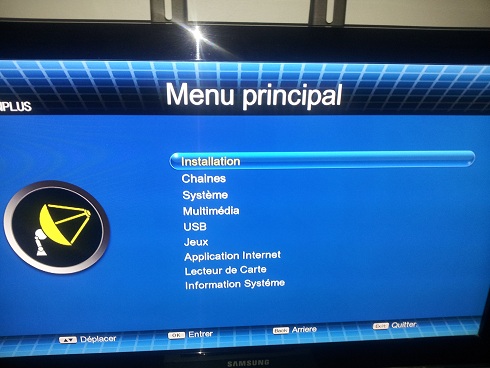
1 / Go to the fennec one menu
2 / Go into the USB line like this
3 / Go to the 2nd line ------------ Config database (images)
4 / A WINDOW will display on the screen including image, Go to the 1st line -----> Save to USB
5 / At this point you will see your USB key (/ udska1)
6 / When you are in the root of your USB key,
choose your directory where to store your complete backup file,
personally I'm choosing the directory fennec one!
7 / Now you press the RED button of the remote control to make your complete backup!
Your backup will be placed at the location chosen
"here in the FENNEC ONE directory!"
Note:
To restore your complete backup, do steps 1 to 4, then choose restore from USB, then go to your directory where you have to save the file and
click on ----------> usrdbsystemdb_20160527 _ 19-23-17. Bin
Good hack by (mobra31)


 Reply With Quote