Advertise Here
Advertise Here
Advertise Here
Advertise Here
Page 1 of 2 12 LastLast
Results 1 to 10 of 19

Thread: ║E²║Plugin║BackupFlash║v.1.2.3║*.DO WNLOA D║

  1. #1
    Sat-tv te@m dreams@t's Avatar
    Join Date
    15-04-2006
    Location
    FunFiles City
    Posts
    11,330
    Uploads
    6,437
    Likes
    31,789

    ║E²║Plugin║BackupFlash║v.1.2.3║*.DO WNLOA D║

    BackupFlash version5.9

    Plugin function:

    It performs a backup process stored on flash or HDD and flash a new image without having to go to recovery mode

    Install the plugin
    Delete the plugin
    Code:
    rm -rf /usr/lib/enigma2/python/Plugins/Extensions/backupflashe2
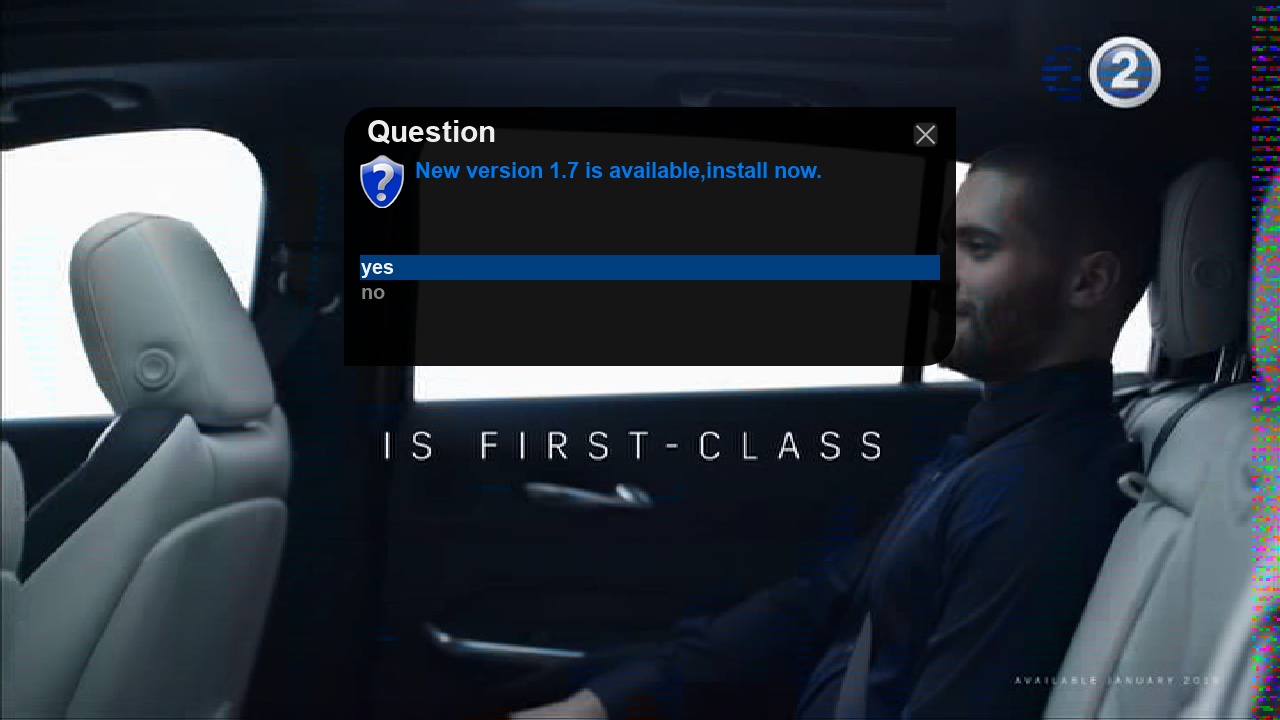
    Update the plugin directly from the plugin by pressing the menu button or in the event that there is a new version, the plugin will tell you this when you open it


    The piling process is very easy...

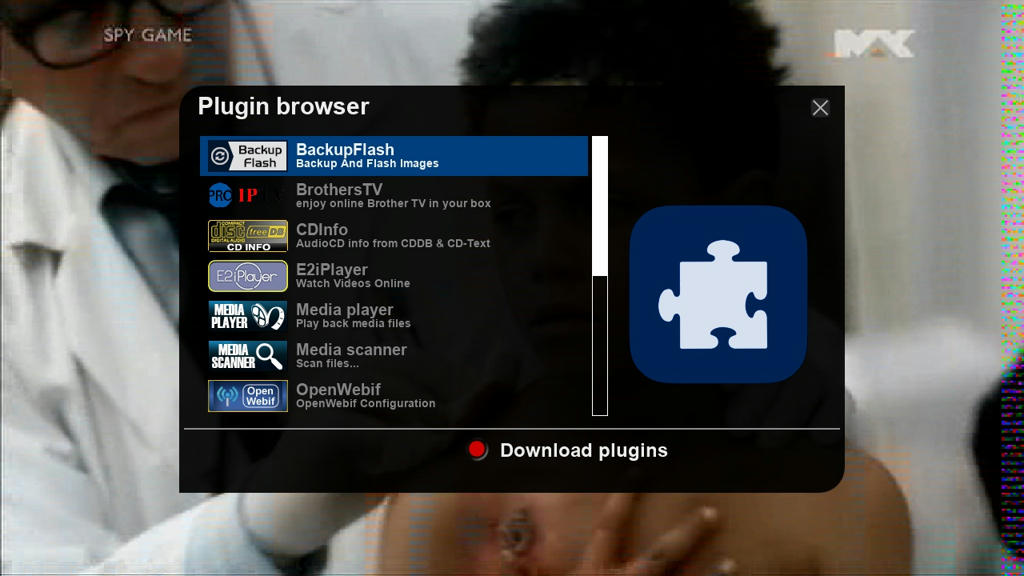
    1- This is the plugin first


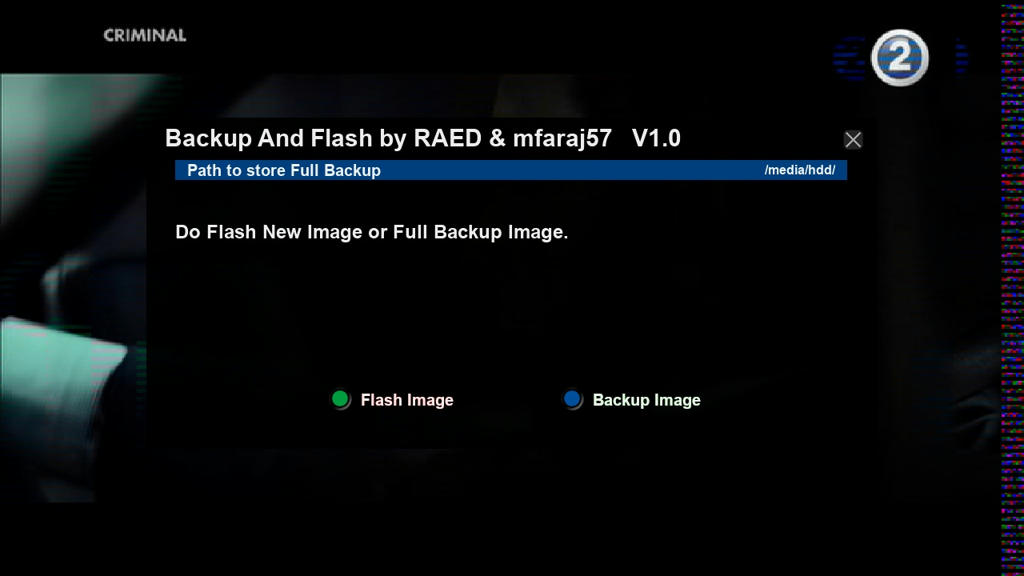
    2- When we open it, it automatically identifies the parts connected to the device, and if it does not find anything, it tells you that there are no connected parts, and you must go to Device manager for the mount process

    3- Then the path of the piece will appear above, and if there is more than one piece, it can be changed by moving the arrow right or left

    4- Pressing the blue BackUp Image button performs the process of "Full Backup" for an image, and it takes from one to two minutes, depending on the size of the image.

    5- Pressing the green Flash Image button takes us to the list of selecting the image that we want to install on the internal flash


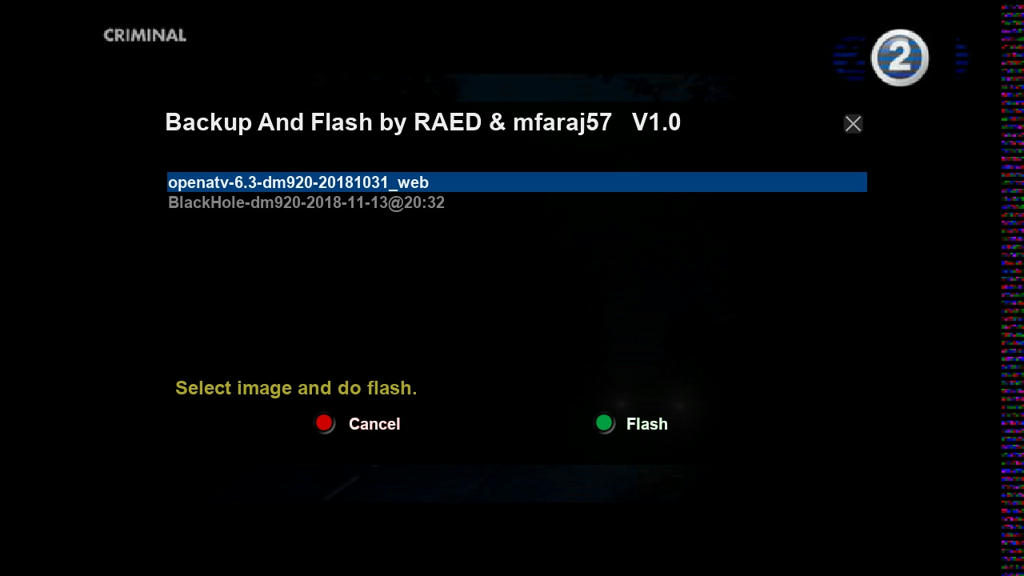
    6- The images must be placed in the pieces connected to the dream in any format, it does not matter whether xz or gz or bz2 or zip

    7- After identifying the images, we choose the image that we want to install and press the green button Flash and the plug alone will flash the process and restart the device to boot on the new image.


    Thx @RAED & mfaraj57
    Attached Files Attached Files

  2. Advertise Here
  3. #2
    Sat-tv te@m dreams@t's Avatar
    Join Date
    15-04-2006
    Location
    FunFiles City
    Posts
    11,330
    Uploads
    6,437
    Likes
    31,789

    Re: [OE2.0/2.5] Plugin BackupFlash

    Update Version 6.0

    -Add NonSoloSat Images in Images upload area
    -Correction of some image download links for some teams

    Thx @RAED
    Attached Files Attached Files

  4. #3
    Sat-tv te@m dreams@t's Avatar
    Join Date
    15-04-2006
    Location
    FunFiles City
    Posts
    11,330
    Uploads
    6,437
    Likes
    31,789

    Re: [OE2.0/2.5] Plugin BackupFlash

    -03.03.2022-

    Update Version
    6.1


    Thx @RAED
    Attached Files Attached Files

  5. #4
    Sat-tv te@m dreams@t's Avatar
    Join Date
    15-04-2006
    Location
    FunFiles City
    Posts
    11,330
    Uploads
    6,437
    Likes
    31,789

    Re: [OE2.0/2.5] Plugin BackupFlash

    -20.03.2022-

    Update Version
    6.1


    Thx @RAED
    Attached Files Attached Files

  6. #5
    Super Moderator Mafia_DZ's Avatar
    Join Date
    20-11-2008
    Location
    the justice of god
    Posts
    5,987
    Uploads
    8,600
    Likes
    18,598

    Re: [OE2.0/2.5] Plugin BackupFlash

    BackupFlash

    plugin for new devices OE2.0/2.5 compatible (py2 & py3)


    This plugin is only for new Dreamboxes
    And the plugin guest performs the backup process stored on the flash or HDD and flashes a new image without the need to go to recovery mode

    1- When we open it, it automatically identifies the parts connected to the device, and if it does not find anything, it tells you that there are no connected parts, and you must go to Device manager for the mount process
    2- Then the path of the piece will appear above, and if there is more than one piece, it can be changed by moving the arrow right or left
    3- Pressing the blue BackUp Image button performs the process of “Full Backup Image” and it takes from one to two minutes, depending on the size of the image.
    4- Pressing the green Flash Image button takes us to the list of selecting the image that we want to install on the internal flash
    5- The images must be placed in the pieces connected to the dream in any format, it does not matter whether xz or gz or bz2 or zip
    6- After identifying the images, we choose the image that we want to install and press the green button Flash and the plug alone will flash the process and restart the device to boot on the new image

    -version 6.8
    - Fix the online automatic update feature
    -Add an unofficial openpli image download link -version 6.7
    -Move the plugin, change its download link and updates to the open source
    -version 6.5
    -Added Recovery Mode feature
    Install the plugin directly from the Internet with this command

    PHP Code:
    opkg update 

    opkg install wget

    https
    ://raw.githubusercontent.com/fairbird/backupflash/main/installer.sh 
    to delete the plugin


    PHP Code:
    rm -rf /usr/lib/enigma2/python/Plugins/Extensions/backupflashe 
    Thanks RAED

  7. #6
    Sat-tv te@m dreams@t's Avatar
    Join Date
    15-04-2006
    Location
    FunFiles City
    Posts
    11,330
    Uploads
    6,437
    Likes
    31,789

    Re: [OE2.0/2.5] Plugin BackupFlash

    BackupFlash

    - version 7.4

    - Adding the feature of modifying the name of the backup copy before starting the backup process
    - Fixing the process of deleting the damaged bak after canceling the bak-up

    1672244595496.jpg

    -----------------@@@-----------------

    New version
    Version 7.8
    - Adding the feature of disabling or activating the shutdown of the device after the completion of the backup process

    -----------------@@@-----------------

    Version 7.9
    -Updated OpenaTV and OpenHDF image links

    -----------------@@@-----------------


    Update online

    Version
    8.0

    - Add a new option...
    The backing process is now either from the current image or from any external image that was installed by the multiboot...
    (Currently the plugin supports taking external images installed by BarrAllen, AlanTuning and OpenMultiboot)
    If there are other multiboot plugins that support Dreambox, send me their names and the folder path to which the images are installed
    Install the plugin
    Code:
    wget https://raw.githubusercontent.com/fairbird/backupflash/main/installer.sh -O - | /bin/sh | /bin/sh
    Delete the plugin
    Code:
    rm -rf /usr/lib/enigma2/python/Plugins/Extensions/backupflashe2
    Thx @Raed

  8. #7
    Super Moderator Mafia_DZ's Avatar
    Join Date
    20-11-2008
    Location
    the justice of god
    Posts
    5,987
    Uploads
    8,600
    Likes
    18,598

    Re: [OE2.0/2.5] Plugin BackupFlash

    13.07.2023

    online update v8.6


    thanks fairman

  9. #8
    Super Moderator mehmetkarahanlı's Avatar
    Join Date
    29-12-2017
    Location
    bursa
    Posts
    28,011
    Uploads
    107
    Likes
    17,060

    Thumbs up [E² Plugin] BackupFlash

    BackupFlash plugin for new devices OE2.0/2.5 compatible (py2 & py3)

    This plugin is only for new Dreamboxes
    And the plugin guest performs the backup process stored on the flash or HDD and flashes a new image without the need to go to recovery mode

    1- When we open it, it automatically identifies the parts connected to the device, and if it does not find anything, it tells you that there are no connected parts, and you must go to Device manager for the mount process
    2- Then the path of the piece will appear above, and if there is more than one piece, it can be changed by moving the arrow right or left
    3- Pressing the blue BackUp Image button performs the process of “Full Backup Image” and it takes from one to two minutes, depending on the size of the image.
    4- Pressing the green Flash Image button takes us to the list of selecting the image that we want to install on the internal flash
    5- The images must be placed in the pieces connected to the dream in any format, it does not matter whether xz or gz or bz2 or zip
    6- After identifying the images, we choose the image that we want to install and press the green button Flash and the plug alone will flash the process and restart the device to boot on the new image

    -version 6.8
    - Fix the online automatic update feature
    -Add an unofficial openpli image download link -version 6.7
    -Move the plugin, change its download link and updates to the open source
    -version 6.5
    -Added Recovery Mode feature
    Install the plugin directly from the Internet with this command
    opkg update

    opkg install wget
    wget https://raw.githubusercontent.com/fa...n/installer.sh -O - | /bin/sh


    to delete the plugin
    rm -rf /usr/lib/enigma2/python/Plugins/Extensions/backupflashe


    Thanks RAED

  10. #9
    Super Moderator mehmetkarahanlı's Avatar
    Join Date
    29-12-2017
    Location
    bursa
    Posts
    28,011
    Uploads
    107
    Likes
    17,060

    Re: [E² Plugin] BackupFlash

    BackupFlash plugin for new devices OE2.0/2.5 compatible (py2 & py3)

    This plugin is only for new Dreamboxes
    And the plugin guest performs the backup process stored on the flash or HDD and flashes a new image without the need to go to recovery mode

    1- When we open it, it automatically identifies the parts connected to the device, and if it does not find anything, it tells you that there are no connected parts, and you must go to Device manager for the mount process
    2- Then the path of the piece will appear above, and if there is more than one piece, it can be changed by moving the arrow right or left
    3- Pressing the blue BackUp Image button performs the process of “Full Backup Image” and it takes from one to two minutes, depending on the size of the image.
    4- Pressing the green Flash Image button takes us to the list of selecting the image that we want to install on the internal flash
    5- The images must be placed in the pieces connected to the dream in any format, it does not matter whether xz or gz or bz2 or zip
    6- After identifying the images, we choose the image that we want to install and press the green button Flash and the plug alone will flash the process and restart the device to boot on the new image


    -version 6.8
    - Fix the online automatic update feature
    -Add an unofficial openpli image download link -version 6.7
    -Move the plugin, change its download link and updates to the open source
    -version 6.5
    -Added Recovery Mode feature
    Install the plugin directly from the Internet with this command
    opkg update opkg install wget wget https://raw.githubusercontent.com/fa...n/installer.sh -O - | /bin/sh


    to delete the plugin
    rm -rf /usr/lib/enigma2/python/Plugins/Extensions/backupflashe
    Thanks RAED


  11. #10
    Super Moderator mehmetkarahanlı's Avatar
    Join Date
    29-12-2017
    Location
    bursa
    Posts
    28,011
    Uploads
    107
    Likes
    17,060

    Re: [E² Plugin] BackupFlash

    BackupFlash plugin for new devices OE2.0/2.5 compatible (py2 & py3)


    New online : versıon 10.1
    UPTADE : 06.04.2025
    Update online
    Version 10.1

    * Add url download for OpenPLI-Japhar Team

Page 1 of 2 12 LastLast
Advertise Here

Similar Threads

  1. Replies: 34
    Last Post: 02-06-2026, 21:41:48
  2. Update ║➽║E²║Plugin║➽║Simply Sports All║v.5.9║DOWNLOAD║
    By mehmetkarahanlı in forum Enigma2 Plugins
    Replies: 21
    Last Post: 13-05-2026, 20:26:55
  3. Replies: 4
    Last Post: 10-05-2026, 20:09:15
  4. Update ║E²║Plugin║⇨Linuxsat Panel║v.2.9.0║*.DOWNLOAD║
    By mehmetkarahanlı in forum Enigma2 Plugins
    Replies: 15
    Last Post: 11-03-2026, 02:47:32
  5. Update ║E²║Plugin║ Smart Addons Panel║v.5.0.3║DOWNLOAD║
    By mehmetkarahanlı in forum Enigma2 Plugins
    Replies: 2
    Last Post: 09-01-2026, 22:44:02

Posting Permissions

  • You may not post new threads
  • You may not post replies
  • You may not post attachments
  • You may not edit your posts
  •