15.12.2023
TheWeather
2.3_r3 py2 & py3
ipk-deb
Thanks Lululla






15.12.2023
TheWeather
2.3_r3 py2 & py3
ipk-deb
Thanks Lululla


TheWeather
2.4_r1 py2 & py3
TheWeather
V.2.4_r3
py2 & py3


 [E² Plugin] TheWeather plugin
TheWeather_v2.0
In general its just the easy switching between standard icons and extra icons (thx to Biko)!
It works easy:
Install and startup V2.0 go in the Menu and press Help
Choose "Extra Icons" for the Biko icons.
And reboot the plugin (2X) to be sure the icons are refreshed.
Now its ready to use.
Choose "Standard Icons" if you want to go back standard.
Extra Icons
Thanks Caught
DOWNLOAD PY2
DOWNLOAD PY3
TheWeather_v2.3
Change:
Add smaller lines in the Extra_images folder.
Needed when you use the Extra Icons made by Biko!
Thanks Caught
DOWNLOAD PY2
DOWNLOAD PY3
TheWeather_v2.5
V.2.5_r0
17.10.2024
minor fix
enigma2-plugin-extensions-theweather-py2-py3_2.5_r0_all
Thanks Lululla
DOWNLOAD PY2 - PY3
New plugin "TheWeather" New version 2.3!
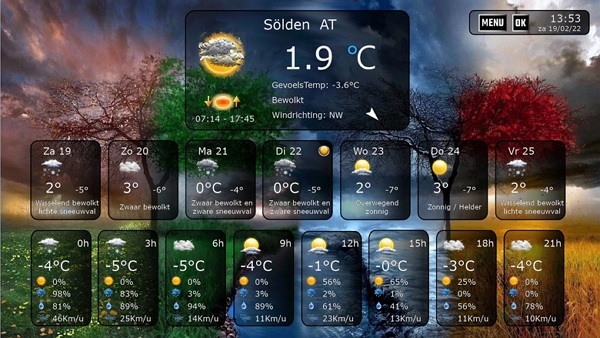
New rebuild of my weather plugin for Enigma2 IPK or DEB installation.
GB - DE - NL - FR - RU - IT - UA - AR - EL - PL
Additional languages can be made on request and collaboration.
Red ° temp go's up 1°C/h
White ° temp stay's even
Blue ° temp go's down 1°C/hDOWNLOADThanks @ Biko for the smart script wget command line below...
Through a smart script (which explore the image py2 - py3 and ipk or deb files)
Will install the right version on your Enigma2 box.
Just copy the link and paste it via telnet....
wget https://raw.githubusercontent.com/biko- ... staller.sh -O - | /bin/sh
enigma2-plugin-extensions-theweather-py2_2.3_all
enigma2-plugin-extensions-theweather-v2.3-py2.deb
enigma2-plugin-extensions-theweather-py3_2.3_all
07.01.2025
TheWeather
V.2.6_r0
recoded
Thanks Lululla
enigma2-plugin-extensions-oaweather_3.3 _all.ipk
v.3.3
-on/off on setup
-clean code
thanks lululla
DOWNLOAD ipk
TheWeather Plugin Moded by iet5 for py2 and py3
iet5 wrote
This update represents a major step forward for the plugin, with a wide range of improvements and code changes aimed at enhancing performance, reducing size, and making customization easier.
Because the plugin was quite large in previous versions, and based on the advice of my brother and friend Lululla , thanks my friend, I restructured the code and achieved the following results:
The plugin size in the previous version was between 38 and 39 MB.
After these changes, the new size is now only between 2 and 3 MB.
Among the most important changes in this release:
- The plugin size has been significantly reduced.
- The plugin now includes only two backgrounds by default.
- Backgrounds can now be downloaded separately, and I will attach the method for downloading them.
- There are now two types of backgrounds available: compressed backgrounds and normal uncompressed backgrounds.
- Users can download whichever type they prefer.
- It is now possible to add an unlimited number of high-quality backgrounds, as long as the required naming convention is followed.
- As soon as backgrounds are added or downloaded, they will appear مباشرة inside the plugin without any extra steps.
The number of duplicate icons has also been reduced. Previously, there was more than one folder containing multiple icon sets. Now, only one folder with high-resolution images is used, and they are automatically adjusted to fit the plugin.
Instead of relying on multiple folders for different screen resolutions such as HD, FHD, and others, it is now possible to use just one folder containing high-quality images, with an option that automatically resizes them according to the user’s screen resolution.
The icon image matching mechanism has also been improved, so it now depends more accurately on the actual name and the real weather condition.
Important note:
Due to the major changes in the plugin folders, the plugin must be completely removed before reinstalling it, to ensure that the new version works correctly.
This is the script for re-installation.
This is the line for downloading the compressed icons or backgrounds, which includes 14 backgrounds.PHP Code:wget -qO- "https://raw.githubusercontent.com/Saiedf/TheWeatherIet5/main/installer_theweatheriet5_auto.sh" | /bin/sh
And this is the line for downloading the full-size icons or backgrounds, which also includes 14 backgrounds.PHP Code:wget -qO- "https://codeload.github.com/Saiedf/TheWeatherIet5/tar.gz/refs/heads/main" | tar -xz -C "/usr/lib/enigma2/python/Plugins/Extensions/TheWeatherIet5/Images/background" --strip-components=4 "TheWeatherIet5-main/Images/compressed/background"
PHP Code:wget -qO- "https://codeload.github.com/Saiedf/TheWeatherIet5/tar.gz/refs/heads/main" | tar -xz -C "/usr/lib/enigma2/python/Plugins/Extensions/TheWeatherIet5/Images/background" --strip-components=4 "TheWeatherIet5-main/Images/OriginalSize/background"
PHP Code:enigma2-plugin-extensions-theweatheriet5_5.3_all.ipk
PHP Code:enigma2-plugin-extensions-theweatheriet5_5.3_all.deb
 Posting Permissions

 Reply With Quote