


Free Cline Lite for Oscam Only
Due to repeated complaints about sources of other free Cline plugins always dying and then having to wait for the plugin author to update the source list as they embed them in the code.
I thought I would share my very basic no frills Cline scraper for oscam I wrote many moons ago, but never finished.
Note this plugin requires some manual setup. It also doesn't automatically update daily. You have to manually run it daily. (As I never got round to adding in the daily automation)
How it works.
Your source list lives in
Code:/etc/enigma2/freeclinelite/sources.txt
These websites get scraped for free clines. Only works if the cline is in the source code, or in a generated .php file.
The .php files can be found on most sites by opening up dev tools in a browser (F12) , clicking the network tab, refresh the page and then filtering the network tab with "php"
My code is using regex to look for [C: url port username password] on the page.
Alternatively there is
This file is used for manually entering a cline from a website that requires some captcha input and cannot automatically be scraped.Code:/etc/enigma2/freeclinelite/lines.txt
Entries in here are standard cccam format
C: f2.kcccam.live 20412 1366481 kcccam.org
Oscam folder location is defined in plugin.py
Code:/usr/lib/enigma2/python/Plugins/Extensions/FreeClineLite/plugin.py
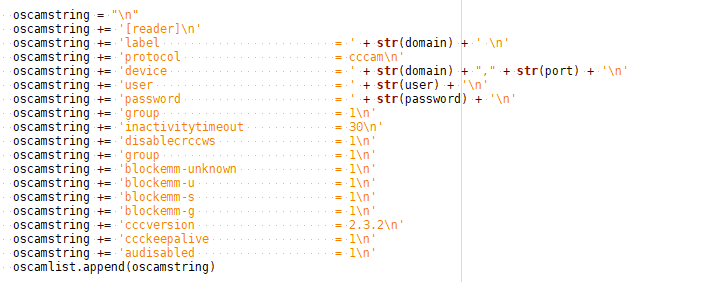
Your oscam server code is defined here if you wish to amend the generated strings to your own preference.
Code:/usr/lib/enigma2/python/Plugins/Extensions/FreeClineLite/download.py
How to use
Firstly clean your oscam.server file to only have any saved lines you want to keep.
On openatv this lives in
Edit your sources.txt / lines.txt files if you have new sources / linesCode:/etc/tuxbox/config/oscam-stable/oscam.server
Edit your oscam root folder in plugin.py as they differ on various images. (reboot gui required)
Run the plugin from the plugins menu.
Select your oscam main folder in settings, if you have more than one oscam folder on the go.
Click Manual Run
Click Restart Softcams
Your oscam.server file will now have populated with your new daily lines.
The next time you run it, it will delete this free list and generate a new list. Only run it once a day otherwise the lines will fail.
Note the previous scans result live inDelete that file if your oscam.server file is getting full of junk.Code:/etc/enigma2/freeclinelite/servers.json.
Original (none free) clines in oscam.server will remain in tact.
Sources - change often. You will have to keep an eye on the sources and manual update where necessary.
Feel free to list sources on this page for others to use.
Feel free to share oscam folder locations for other images.
This is a throw-away plugin I wrote. I will not be actively maintaining it, or constantly updating the sources for you.
Which is why is dead easy for a user to amend the sources.
It has only been tested on openatv 6.4 (python 2.7). It probably doesn't work on dreamboxes as that uses different commands for starting / stopping softcams.
It is what it is. It either works for you, or it doesn't. But might be useful to some people.
Do note I am not a softcam expert. Clines are very hit and miss nowadays. If the servers are down, failing, overloaded, timing out or if channels stay black sometimes.
Thats just the way it is. They are free trial lines. Sometimes they work, sometimes they don't.
And delete any flaky/slow/dead lines from your source list. More is not neccessarily better. You only need a couple of good sources that work for your satelitte.
If you wish to check your oscam connections and live logs via a browser
This is just your ip address and oscam port as defined in oscam.conf file
[webif]
httpport = 83
i.e
192.168.1.1:83
Thx @KiddaC






 Reply With Quote