






Skrypt - Speedy OEA autoinstall
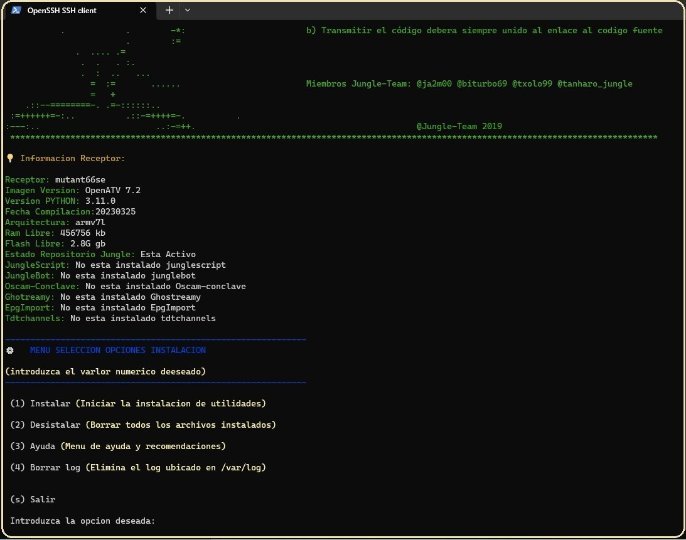
is a script that allows the user to install the most important packages on the enigma2 machine after installing the raw image. Thus, it is a quick way to configure the receiver for use by installing important plugins (plugins and skins). Of course it was designed by the Spanish team based on their interest in add-ons ☜ Only manages Python 3.xx image libraries currently for OpenATV - openspa - Egami the number of images that can be used in it will increase speedy.jpg If you are already familiar with and used previous auto-installers such as autosonic and Bugsbunny, the following changes have been made: What's new in Speedy OEA Autoinstall 1.3: ◀ ◁ An update has been added so you can back up your most important files ◀ ◁ Added the ability to restore a previously created backup ◀ ◁ Added new feature to enter token, token and chat_id for junglebot after install ◀ ◁ Improvements in entering cccam lines after installing cccam_spain, now multiple lines can be entered and the code is already inserted in the original script, not like in the previous version with which the additional script was downloaded ◀ ◁ Correct spelling errors What's new in Speedy OEA Autoinstall 1.2: ◀ ◁ The code pulls old lines from previous versions, now all the code has been revised, practically from scratch ◀ ◁ Organize shellcode functions by adding task labels to them ◀ ◁ Created a package install module function that is called to install various packages, reducing the previous 300 lines of code, avoiding code duplication ◀ ◁ Added several ways to install, in some packages it is used to force re-install because there are people who installed the package and they try to re-install it, so now it will install again ◀ ◁ The color function code issue has been resolved ◀ ◁ The verification code was added before installing the libraries. If it is already installed, it will not be installed again ◀ ◁ The output of messages and menus has been modified with brighter colors and icons for a better look ◀ ◁ Improved history deletion check and remove history list which is unnecessary ◀ ◁ The package removal module has been completely modified, it now checks and removes installed modules ◀ ◁ The help module has been modified, its menu has been removed and is now visible for 20 seconds ◀ ◁ The password change module has been modified, now the password that we enter in the console is no longer visible ◀ ◁ Autocorrect has been removed from the receiving bootlogo, now it will ask if you want to install it or not ◀ ◁ All code has been added to github so users can better see what it does ◀ ◁ Remove some installation packages and add new ones ◀ ◁ Refactored progress bar, debugged in your own code – Official Openatv emu repositories and jungle team repository – JungleScript - Automatic list of channel and icon installs – JungleBot - To control the receiver via Telegram – Oscam-Conclave - Automatic installation of the latest version of oscam – Oscam-Trunk - version of oscam compiled by openatv – CCcam 2.3.2 - Stable version for Spain – Ncam — an emulator based on Oscam – Ghostreamy – Stream Enigma2 management panel – EpgImport – To download EPG with official koala sources for Movistar+ – Zerotier – To access the receiver via VPN – Tdtchannels – create favorites and picon DTT channels via the Internet – Tailscale – To access the receiver via VPN – Diseqc – For Unicable LNB programming – Assign a password to the receiver – Automatically set the time of the receiver – FoonSat – For football sports events – – Streamproxy – activate openwebif streaming pass request – Oscam icam – Improved Oscam for German channels – jedimakerxtream – To install iptv lists in our receiver – jediepgxtream – To assign epg to iptv channels – openvpn – To access the receiver via VPN – FootOnsat – Information about sporting events – op-artkoala skin – epgmhw2 – Epg from the cover channel – xstreamity – To install iptv lists – JungleScript Tools – Junglescript GUI plug-in
wget -q '--no-check-certificate' https://raw.githubusercontent.com/ju...utoinstall.sh; bash speedy_OEA_autoinstall.sh; rm -r speedy_OEA_autoinstall.sh
źródło Poczytaj https://jungle--team-com.translate.g..._x_tr_pto=wapp


 Reply With Quote
