This is the
README for the
Barry Allen 14 Plugin
It allows you to extract, boot and backup Images
on an USB stick or SD card and supports the
Dreambox one, two, dm900 and dm920.
For Barry Allen 14 device support, please check the Alan Turing README, because Barry Allen joined
the Speed Force after his death in the Crisis of
Infinite Earths!
Dark Flash is refusing to give up trying to save his timeline!
Finally, if you pretend to know better, but you are not able to do better,
then better shut up!
@@@ How do I install it?
It is installed via and dependant from the gutemine3 Feed Plugin For installing the gutemine3 Feed on your one/two enter the below
3 lines of commands in telnet or ssh on your Dreambox:
echo "deb [trusted=yes]
https://repo.fury.io/gm3/ ./" > /etc/apt/sources.list.d/gutemine.list
apt-get update
apt-get install enigma2-plugin-systemplugins-gutemine
For installing the gutemine3 Feed on the fully UNSUPPORTED old Dreambox dm9x0 BEFORE entering the above 3 commands, you
you HAVE to enter FIRST the below commands in telnet or ssh:
apt-get update
apt-get upgrade
apt-get install kernel-module-fuse kernel-module-nfsd apt-transport-https
@@@ Why does this Plugin NOT work together with XYZ Panel or Feed?
Due to the misuse and unauthorized distribution and patching of some of my Plugins, they are are now protected by the
GHOST RIDER, who removes and blocks such Panels and Feeds.
**************************************** *************************
IF YOU DO NOT LIKE THAT, THEN ASK THESE PEOPLE
TO STOP THIS VIOLATION OF MY RIGHTS AS THE AUTHOR!
**************************************** *************************
@@@ What about Support for Open Images?
If posted offline and unauthorized kits are NOT removed, then
Open Images support can be REMOVED and/or blocked anytime!
@@@ Which devices does the Plugin support?
It supports ONLY SD Cards and USB devices with a size of 32/64/128GB. 16GB also works, but will be
probably removed when partitioning support is activated.
@@@ Why is my USB or SD device not listed or recognized?
If your device is within the above size limits and is not listed, than you probably have a movie directory on it
and such devices are ignored. Erase on a PC and do NOT
mount it on your Dreambox at all and it will be listed
and accepted by the Plugin.
@ OK, but WHY is always my USB or my SD card selected whenever
I reboot?
This depeds simply which one is faster deteced, if you want
to select a specific device automatically you would need to unplug everything except the prefered candidate.
@ Does this mean that I also have to unplug the (USB) Harddisk?
First harddiskes are normally larger than the accepted @ devices
and second they contain a movie directory for the recordings.
This will prevent them from becoming used as boot device, hence there
is NO need to unplug a Harddisk, unless you are dumb enough to use
old version where this didn't work as it should.
@@@ Do I have to mount the device?
NO, this will only have negative effects, as then the Plugin could fail to partition and format it.
@@@ Why can't I format and partition the device myself?
No, this has to be done by the Plugin during
reboot.
@@@ Why are bigger devices or Harddisk NOT supported?
The plugin is repartitioning and formating the device it uses for booting images, hence this size limit is there tp prevent formatting your harddisk with all your recordings.
It would also have severe performance impacts if you boot from a device where you would have continuous syncrhonous writing IO = PVR recording.
@@@ Why are the old Dreamboxes NOT supported?
Since end of the year 2021 gutemine supports ONLY recent Dreamboxes - eg. one/two with DreamOS Images.
@@@ What about support for my old dm9x0?
Since purple day release, there is also a totally UNSUPPORTED Version of the gutemine3 Feed plugin for the armhf architecture
available on the gutemine3 Feed, which allows to run the Plugin and some selected other plugins on the dm9x0.
BUT do NOT expect any support, future versions, or comparable
performance on these old Dreamboxes!
@@@ How do I specify which device is used by the Plugin to place my unpacked Images ?
You don't need to specify which device to use, it has not even to be present during Plugin installation, but as soon as you will use the Plugin to create a new image (Restore, Copy from Flash, etc.) the Plugin will pick the first device which is within the (16)32-128 GB Size limit and is NOT having a movie directory on it (=Harddisk, or Harddisk replacement).
@@@ Why is the code of some of gutemine's Plugins NOT modifyable?
Due to the misuse of some of my pluins, the gutemine3 Feed, the
User Scripts and the dBackup3 Plugins are NOT modifiable,
despite the Python sources being shipped and included in the installation kits.
@@@ Can I put also other things on the devices used by the
Plugin?
The Plugin currently stores ONLY the Images either in directories.
ALL other files and directories except Images are NOT supported and will be deleted on the devices.
@@@ What is this Debian installation in the Plugin about ?
It allows you to download and install a Debian bullseye
distribution.
@@@ What is the default password for the user debian created for login to bullseye gnome desktop?
As of now it is simply: dreambox
@@@ Why is /media/at/backup directoy NOT supported anymore?
Because people gave WRONG instructions to create the directory
manually, or even worse to mount devices there manually.
@@@ Why is /media/at/picon also NOT supported anymore?
Looks like nobody used it and /data/picon is a better place and
finally for full partition support ONLY Images will be supported on the @ device.
@@@ What is the "Backups Wizard" screen good for?
In the Backups screen you get ONLY tar.gz, tar.xz and tar.bz2
backups listed from /media/hdd/backup and /data/backup.
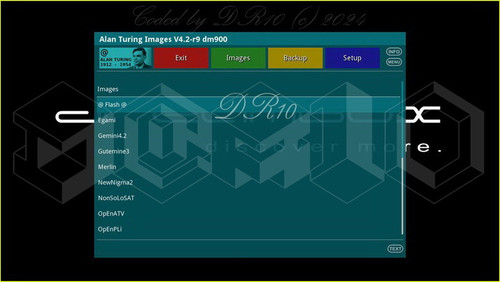
@@@ What is the "Images Wizard" screen on green good for?
In the Images screen you see the images which were put onto the Plugin device (and the Flash image off course)
@@@ What is the "Setup Wizard" screen good for?
This screen gives you the possibility to change the configuration settings that the Plugin offers. It also allows some basic actions like saving the image's current enigma2 settings and restore it from there, which might be helpfull to transfer settings within Images. On pressing yellow in the settings screen of the Plugin device it offers
the possibility to see the look of the bootmanager screen if you change the background or the font, but this can be also changed via settings directly.
Changed Settings will only get saved if you leave the Setup Screen with Green or Yellow, because Red is Exit of the Plugin without save.
@@@ What is the "Settings backup" in the menu on
blue good for?
Some images use their own Software or Feed Manager or
a Panel, therefore this is the possibility to save
your settings on /data/backup and restore them from there. This is usefull to share settings between
different images. @@@ Why does the backupname always contain the boxtype, dreamone/dreamtwo/dreamseven/dm900/dm920, even when I remove it?
This is AUTOMATICALLY added, and the protection to prevent flashing/booting wrong images which are NOT made for a box and could cause damage of your Dreambox. This functionality will be probably modified when Dream Property will introduce
the universal images - which will then be flashable/bootable
on ALL the OE2.6 Dreamboxes.
This behaviour is also the same as in dBackup3. If extracting an image with the Plugin, the boxtype is automatically removed during extraction for the imagename. Therefore it is NOT possible to disable this protection and if you use fake/wrong boxnames in your imagenames then face
the potential consequences. If your image backup is NOT
containing tghe proper boxtype, it will not be shown for extraction
and simply removed until properly named.
@@@ Why can't I rename the backup image to whatever I want?
See answer to previous question, this is to protect you box from flashing/booting wrong images. If you want to rename an image to get afterwards the same name and Imagename in the
imageselection, this is the WRONG approach. Imagenames are fully editable when choosing
Restore of an image in both the Plugin and the webinterface. Image names NOT following the naming convention will simply NOT be shown in the List of images on yellow.
@@@ What is this date and time setting about?
If enabled this will AUTOMATICALLY add the current date and/or time to the imagename, hence it is wrong to type these yourself in the imagename, unless you want it twice. If you do NOT want this behavior simply disable these settings.
@@@ Why is the backup in the Plugin slow?
Probably because you simply didn't install the optional pigz, pbzip2, xz and tar binaries like in the Flash image.
Then your backup runs on a single CPU core
with the busybox binaries. Only when these binaries are installed
full parallelization will be done and the full performance of the
Dreambox is used. This is the same behaviour as
for dBackup3 Plugin.
@@@ Why is tar.bz2 NOT selectable as backup format?
This will be only shown when pbzip2 binary is installed.
@@@ What is this superspreader plugin functionality?
gutemine3 Feed, Alan Turing, Barry Allen, dBackup3 and UserScripts Plugin
are superspreader plugins, meaning if they are installed in the Flash they will also be available in Images booted via the Plugin.
Except the AlanTuring and the Barry Allen Plugin
(which may be only installed in the Flash
image) you may install all these Plugins also locally
in DreamOS Images when they are booted. Keep in mind, that
NONE of my Plugins is allowed to be installed in Open* Images, neither booted via Alan Turing or BarryAllen,
or when OpenImages are directly booted from the Flash of your Dreambox! If you try to circumvent this limitation,
face the consequences!
@@@ Why is this README only shown when the Flash Image
is booted?
It makes the superspreader functionality easier to implement.
@@@ What are the traffic lights on the left bottom boot
menu screen for?
The left most shows if the test kit is in his validity period.
Green means all OK, yellow means last month before expiration
and a red one means that the test kit has expired and only
basic functionality is left. Expired kits for example
will NOT allow to boot images with this Plugin or flash images directly
from dBackup3, etc.
The left traffic light becomes also Red if a manipulation of my
Plugins is detected and the GHOST RIDER will be activated.
The middle traffic light indicates if Open* Images are supported for booting with this plugin and the number 2 or 3
number in the cirlce indicates which python version currently the feed plugin is running on.
The right most traffic light indicates if the GHOST RIDER removes and blocks panels, plugins
and feeds of people who violate my right as
the author of my plugins. When it is Yellow you are having
your honeymoon, BUT if you try to tinker with
my plugins honeymoon is over instantly.
@@@ Why then this prohibitive signs on the boot menu and when flashing with dBackup3?
After honeymoon, this is for information
purpose and indicates where you may complain
that these people and teams are violating my right
as the author of my Plugins and indicate that you now have to suffer from gutemine's reaction to their wrong doing.
@@@ What is this GHOST RIDER protection?
As a starting point I recommend watching the 2007
movie with Nicolas Cage playing the Ghost Rider,
or have a read of the original Marvel Comic book
series. Then be gutemine's guest and as long as you are NOT a Blackheart you have nothing to fear
and the GHOST RIDER will not come after your souls!
!!! Have fun with the Barry Allen Plugin !!!
gutemine


 Reply With Quote