Advertise Here
Advertise Here
Advertise Here
Advertise Here
Page 1 of 2 12 LastLast
Results 1 to 10 of 11

Thread: ║➽║ Lats ver. PuTTY SSH-Client║v.0.83 ║DOWNLOAD║

  1. #1
    Super Moderator mehmetkarahanlı's Avatar
    Join Date
    29-12-2017
    Location
    bursa
    Posts
    29,430
    Uploads
    107
    Likes
    17,152

    ║➽║ Lats ver. PuTTY SSH-Client║v.0.83 ║DOWNLOAD║

    Latest versıon PuTTY SSH-Client
    versıon 0.82 UPTADE
    UPTADE Online 02.12.2024
    Putty v0.82

    New update:27.11.2024
    - Major refactoring of Unicode handling to allow the use of 'foreign' Unicode characters, i.e. outside the system's configured default character set / code page. Not yet complete, but the following things work:
    Windows console: usernames and passwords entered interactively into PSCP, PSFTP and Plink can use foreign characters.


    Windows command line: usernames, remote commands, and filenames entered via command-line options can use foreign characters.
    PuTTY's own terminal (on Windows and Unix): even if it's not configured into UTF-8 mode for the main session, interactive usernames and passwords can use foreign characters.
    - Unicode version update: all character analysis is updated to Unicode 16.0.0.
    - Unicode terminal rendering: national and regional flags are now understood by PuTTY's terminal emulator. (However, correct display of those flags will depend on fonts and operating system.)
    - The Event Log mentions the local address and port number of the outgoing connection socket.
    - Bracketed paste mode can now be turned off in the Terminal > Features panel.
    - Unix Pageant: new --foreground mode for running as a subprocess.
    - Bug fix: the 'border width' configuration option is now honoured even when the window is maximised.
    - Bug fix: SHA-2 based RSA signatures are now sent with correct zero padding.
    - Bug fix: terminal wrap mishandling caused occasional incorrect redraws in curses-based applications.
    - Bug fix: Alt + function key in "Xterm 216+" mode sent a spurious extra escape character.


    DOWNLOAD

    DownLoad_PuTTY_Release_v0.82


  2. Advertise Here
  3. #2
    Super Moderator mehmetkarahanlı's Avatar
    Join Date
    29-12-2017
    Location
    bursa
    Posts
    29,430
    Uploads
    107
    Likes
    17,152

    Re: ➽║Latest versıon PuTTY SSH-Client ║

    Latest versıon PuTTY SSH-Client
    Versıon 0.83
    UPTADE Online 08.02.2025

    Download PuTTY

    PuTTY is an SSH and telnet client, developed originally by Simon Tatham for the Windows platform. PuTTY is open source software that is available with source code and is developed and supported by a group of volunteers.


    DOWNLOAD

    Download PuTTY

  4. #3
    Super Moderator mehmetkarahanlı's Avatar
    Join Date
    29-12-2017
    Location
    bursa
    Posts
    29,430
    Uploads
    107
    Likes
    17,152

    Re: ➽║Latest versıon PuTTY SSH-Client ║

    Latest versıon PuTTY SSH-Client
    versıon 0.83 UPTADE
    UPTADE Online 01.07.2025
    Download PuTTY (0.83) for Windows


  5. #4
    Super Moderator mehmetkarahanlı's Avatar
    Join Date
    29-12-2017
    Location
    bursa
    Posts
    29,430
    Uploads
    107
    Likes
    17,152

    Re: ║➽║ Latest versıon PuTTY SSH-Client ║

    July 31, 2025:


    Looking for PuTTY, the software?


    This page is unaffiliated with the PuTTY project, and is not endorsed by it.
    The PuTTY project or its authors have never owned this domain, registered it, or purchased it.
    The domain was originally registered in 1999, for purposes unrelated to software.
    Several other putty.* domains exist, and apparently do not receive complaints.

  6. #5
    Super Moderator mehmetkarahanlı's Avatar
    Join Date
    29-12-2017
    Location
    bursa
    Posts
    29,430
    Uploads
    107
    Likes
    17,152

    Re: ║➽║ Latest versıon PuTTY SSH-Client ║

    Latest versıon PuTTY SSH Client
    New versıon Standart /0.83

    03.11.2025 / UPDATE

    putty v0.83

    putty v0.83

    Support for ML-KEM, the NIST-standardised post-quantum key exchange mechanism. (In addition to NTRU Prime, which has been supported since 0.78.)
    Support for full Unicode file names in Windows file selector dialogs. (However, these do not yet round-trip through a saved session.)
    Bug fix: psftp -b works again.
    Bug fix: assertion failure if an SSH connection times out at the login prompt.
    Bug fix: crash in Pageant if an SSH connection is abandoned while waiting for a deferred decryption passphrase.
    Bug fix: tight loop if PuTTY tried to send an empty answerback string.
    Bug fix: accidental truncation of some configuration edit boxes' contents to 127 characters.
    Bug fix: Windows XP support was accidentally broken, and now reinstated.
    Bug fix: restored interoperation with third-party tools that auto-fill login prompts by sending ^M for Return.
    Bug fix: confusion when terminal window resized by tools like FancyZones.

    Bug fix: the small keypad keys didn't reliably work in the terminal on Unix.


    DOWNLOAD

    MSI (‘Windows Installer’)
    64-bit x86: http://putty-64bit-0.83-installer.msi
    64-bit Arm: http://putty-arm64-0.83-installer.msi
    32-bit x86: http://putty-0.83-installer.msi


    Unix source archive
    .tar.gz:http://putty-0.83.tar.gz

  7. #6
    Super Moderator mehmetkarahanlı's Avatar
    Join Date
    29-12-2017
    Location
    bursa
    Posts
    29,430
    Uploads
    107
    Likes
    17,152

    Re: ║➽║ Latest versıon PuTTY SSH-Client ║

    Latest versıon PuTTY SSH Client
    New versıon Standart /0.83

    03.11.2025 / UPDATE


    putty v0.83


    DOWNLOAD

    Package files

    You probably want one of these. They include versions of all the PuTTY utilities (except the new and slightly experimental Windows pterm).
    (Not sure whether you want the 32-bit or the 64-bit version? Read the FAQ entry.)
    We also publish the latest PuTTY installers for all Windows architectures as a free-of-charge download at the Microsoft Store; they usually take a few days to appear there after we release them.
    MSI (‘Windows Installer’)
    64-bit x86: putty-64bit-0.83-installer.msi (signature)
    64-bit Arm: putty-arm64-0.83-installer.msi (signature)
    32-bit x86: putty-0.83-installer.msi (signature)
    Unix source archive
    .tar.gz: putty-0.83.tar.gz (signature)

    Alternative binary files

    The installer packages above will provide versions of all of these (except PuTTYtel and pterm), but you can download standalone binaries one by one if you prefer.
    (Not sure whether you want the 32-bit or the 64-bit version? Read the FAQ entry.)
    putty.exe (the SSH and Telnet client itself)
    64-bit x86: putty.exe (signature)
    64-bit Arm: putty.exe (signature)
    32-bit x86: putty.exe (signature)
    pscp.exe (an SCP client, i.e. command-line secure file copy)
    64-bit x86: pscp.exe (signature)
    64-bit Arm: pscp.exe (signature)
    32-bit x86: pscp.exe (signature)
    psftp.exe (an SFTP client, i.e. general file transfer sessions much like FTP)
    64-bit x86: psftp.exe (signature)
    64-bit Arm: psftp.exe (signature)
    32-bit x86: psftp.exe (signature)
    puttytel.exe (a Telnet-only client)
    64-bit x86: puttytel.exe (signature)
    64-bit Arm: puttytel.exe (signature)
    32-bit x86: puttytel.exe (signature)
    plink.exe (a command-line interface to the PuTTY back ends)
    64-bit x86: plink.exe (signature)
    64-bit Arm: plink.exe (signature)
    32-bit x86: plink.exe (signature)
    pageant.exe (an SSH authentication agent for PuTTY, PSCP, PSFTP, and Plink)
    64-bit x86: pageant.exe (signature)
    64-bit Arm: pageant.exe (signature)
    32-bit x86: pageant.exe (signature)
    puttygen.exe (a RSA and DSA key generation utility)
    64-bit x86: puttygen.exe (signature)
    64-bit Arm: puttygen.exe (signature)
    32-bit x86: puttygen.exe (signature)
    pterm.exe (a PuTTY-style wrapper for Windows command prompts)
    64-bit x86: pterm.exe (signature)
    64-bit Arm: pterm.exe (signature)
    32-bit x86: pterm.exe (signature)
    putty.zip (a .ZIP archive of all the above except PuTTYtel and pterm)
    64-bit x86: putty.zip (signature)
    64-bit Arm: putty.zip (signature)
    32-bit x86: putty.zip (signature)

    Documentation

    Browse the documentation on the web
    HTML: Contents page
    Downloadable documentation
    Zipped HTML: puttydoc.zip
    Plain text: puttydoc.txt
    Windows HTML Help: putty.chm

    Source code

    Unix source archive
    .tar.gz: putty-0.83.tar.gz (signature)
    Windows source archive
    .zip: putty-src.zip (signature)
    git repository
    Clone: https://git.tartarus.org/simon/putty.git
    gitweb: main | 0.83 release tag

    Downloads for 32-bit Windows on Arm

    Compiled executable files for 32-bit Windows on Arm. We've had reports that these can be useful on Windows IoT Core.
    32-bit Windows on Arm installer
    32-bit Arm: putty-arm32-0.83-installer.msi (signature)
    32-bit Windows on Arm individual executables
    32-bit Arm: putty.exe (signature)
    32-bit Arm: pscp.exe (signature)
    32-bit Arm: psftp.exe (signature)
    32-bit Arm: puttytel.exe (signature)
    32-bit Arm: plink.exe (signature)
    32-bit Arm: pageant.exe (signature)
    32-bit Arm: puttygen.exe (signature)
    32-bit Arm: pterm.exe (signature)
    Zip file of all 32-bit Windows on Arm executables
    32-bit Arm: putty.zip (signature)

    Checksum files

    Cryptographic checksums for all the above files
    MD5: md5sums (signature)
    SHA-1: sha1sums (signature)
    SHA-256: sha256sums (signature)
    SHA-512: sha512sums (signature)

  8. #7
    Super Moderator mehmetkarahanlı's Avatar
    Join Date
    29-12-2017
    Location
    bursa
    Posts
    29,430
    Uploads
    107
    Likes
    17,152

    Re: ║➽║ Latest versıon PuTTY SSH-Client ║

    Latest versıon PuTTY SSH Client
    New versıon Standart /0.83

    04.11.2025 / UPDATE


    putty v0.83

    DOWNLOAD


    Installing PuTTY on Windows

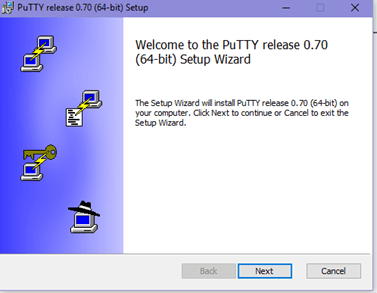
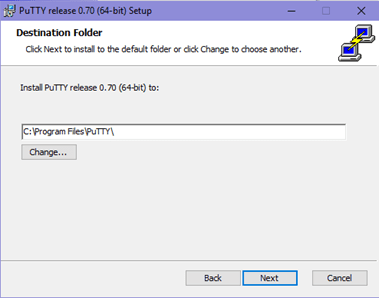
    Once it is successfully downloaded on Windows than follow the following steps to install the software:Double click on the downloaded .msi file and being with the setup process.


    Installing PuTTY in Windows – (step 1)Click on next and then select the path for the installation.


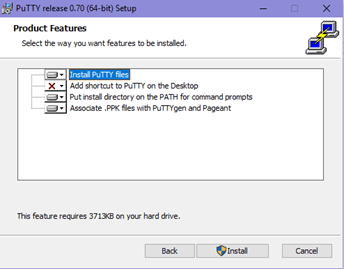
    Installing PuTTY Release in Windows – (step 2)Select the product feature you want to be installed in your system and click on

    install.


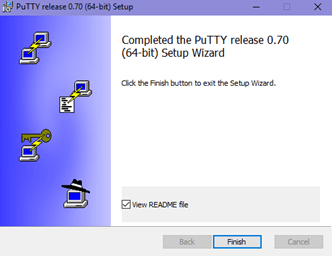
    Install PuTTY Files (Step 3)Click on Finish to complete the setup and close the dialog box.


    Complete Installing PuTTY in WindowsVoila! You are done with the installation.Using SSH in PuTTY (Windows)

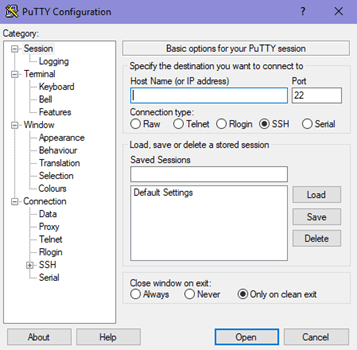
    Following the successful installation, navigate to the location folder where you have installed the application and run the .exe file.


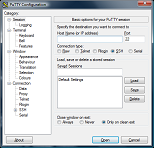
    PuTTY Configuration1. Manage Session in PuTTY

    It is the preliminary panel where you get to specify specific options to open a session.
    • The Host Name (or IP Address) bar is where a user will input the name or IP address of the server they want to connect.
    • Connection type of radio buttons allows users to choose from the kind of network they are planning to connect.
    • The Port bar is the section that is filled automatically on selecting the type of connection. However, if you choose the Raw type, the bar stays blank and requires the user to enter the port manually.
    • Upon selecting Serial as the connection type, the Host Name and Port bars will be replaced by Serial Line and Speed.

    The “Load, save or delete a stored session” section is to set some connection setting without having to type all the details again when needed.
    • Once you save it, it can just select on the saved session and click on Load. The saved settings will appear on their respective boxes in the configuration panel.
    • The panel permits to modify a saved session by first loading a session, editing everything you want to change and then clicking on “save” button.
    • Users have the option to delete a session as well.

    The Close Window On Exit option helps in deciding whether the PuTTY terminal will close as soon as the session ends or restarts the session on the termination.2. What is Logging in PuTTY?

    This configuration panel saved the log files of your PuTTY sessions which can be used for debugging and analysis purposes. Users can choose the type of data you want to log in this window.3. What is Terminal in PuTTY?

    The section has a variety of options to decide how the texts in the window should appear. Whether you want the text to come in the next line as soon as it reaches the right edge of the window or you want to interpret the cursor position.4. Configure Keyboard setting in PuTTY.

    With the option, users can modify the behavior of ‘backspace,’ ‘home’ and ‘end’ keys, and several other keys to coordinate with the server settings.5. What is Bell in PuTTY?

    It lets PuTTY make an alert sound as and when you want it to function.6. Features of PuTTY

    Users can choose to disable or enable some of the advanced terminal features of PuTTY like disabling cursor keys, etc. using the function.7. Adjust the size of Window in PuTTY.

    The option allows to predefine a fixed size of the PuTTY window and control the scrolling. Many other configurations can be made using this feature.8. Change the Appearance of PuTTY

    Under this panel, the appearance of the cursor, the font in the terminal window or even control the window border can be changed.9. What is PuTTY Behaviour?

    Enables to change the title of the window, control the warning window operation, etc.10. What is Translation in PuTTY?

    The “Remote Character Set” lets you select how to interpret the information received from the server.11. What is Selection in PuTTY?

    Users can change the course of copy-pasting or the actions of mouse-buttons in Unix environment by making appropriate changes in this panel.12. How to Adjust Colours in PuTTY?

    You can control the color of background as well as of the texts using this panel.13. Configure Connection in PuTTY.

    The panel has options that solve any issues when closing of connections while a window is idle. With the option, users can select between the old and new protocols.14. Manage Data in PuTTY.

    The auto-login option dismisses the need to type the username every time. It can also specify the terminal needs using this panel.15. A proxy setting in PuTTY

    Permits configuration of various types of proxies used while making the network connections.16. What are Telnet, Rlogin, and SSH in PuTTY?

    These panels allow configuration of session-related options like changing the mode for negotiation between the server and client, allowing an automated form of login on the server, etc.The above were details about the panels and the steps to install PuTTY client on windows.

  9. #8
    Super Moderator mehmetkarahanlı's Avatar
    Join Date
    29-12-2017
    Location
    bursa
    Posts
    29,430
    Uploads
    107
    Likes
    17,152

    Re: ║➽║ Latest versıon PuTTY SSH-Client ║

    Download PuTTY on Linux and Installation Guide

    PuTTY, the open-source and free to download software, provides an easy way to access a Unix shell environment from a windows system. Unlike Unix, Windows don’t have any SSH server or client pre-installed. The network file transfer application supports many protocols including the popular SSH and Telnet clients.PuTTY for Linux

    PuTTY is not only limited to Windows OS, but it’s popular among Linux users too. The Linux version is a graphical terminal program which is not pre-installed in most of the Linux distributions.In various enterprises, many IT projects have their development environment on a remote Linux system where Windows is used as the local system. Why PuTTY? There is already a Linux terminal in the Linux Operating System. Even then, why an SSH tool like PuTTY is preferred?
    • The interface of PuTTY makes it a favorite choice among the users since most of them are accustomed to operating the application on Windows.
    • It has the option of connecting to raw sockets and serial ports.
    • Saving various sessions and loading them in one go is the main highlighting feature of PuTTY that its users swear by since it is difficult to edit sessions whenever logging-in manually.

    Install PuTTY on Linux

    On a Linux-based system, PuTTY can easily be installed via terminal. Let us look at the steps of installing the server application on a Ubuntu machine.1. As a prerequisite, it is necessary to make sure whether the universe repository of Ubuntu is enabled or not.Type the command:sudo add-apt-repository universeand hit enter.2. Generally, PuTTY is already available in the repository of Ubuntu. Before starting with the installation process, update the packages and repositories of Ubuntu using the command:sudo apt-get updateNote: The command would make sure that Ubuntu installs the latest version of PuTTY, in case, it might install the older versions of the software. The word “sudo” in the command is used to instruct the terminal to run the update command as “root” since a user might not have privileges to get going with the installation and updation. It will prompt you to enter the username and password if you have the required access.3. Now, run the command:sudo apt-get install PuTTYIt will complete the installation by installing the application tools.4. A prompt will asked if you want to continue the installation. Press ‘y’.
    [COLOR=#5F6368 !important]Discover more
    [COLOR=#1A73E8 !important][COLOR=inherit !important]
    [/COLOR][COLOR=inherit !important]Data recovery tools[/COLOR]
    [/COLOR]
    [COLOR=#1A73E8 !important][COLOR=inherit !important]
    [/COLOR][COLOR=inherit !important]install[/COLOR]
    [/COLOR]
    [COLOR=#1A73E8 !important][COLOR=inherit !important]
    [/COLOR][COLOR=inherit !important]Mac operating systems[/COLOR]
    [/COLOR]
    [COLOR=#1A73E8 !important][COLOR=inherit !important]
    [/COLOR][COLOR=inherit !important]Putty[/COLOR]
    [/COLOR]


    [/COLOR]
    5. PuTTY tools will be unpacked and set up in the further process.6. To confirm if that the installation is successful, run the command:sudo dpkg -l PuTTYIt will display information about the application such as version, architecture, and description.Installation of PuTTY on other Linux distributions

    In Debian based Linux system, use apt-get or aptitude to install the server application PuTTY. The command is:sudo apt-get install PuTTYPuTTY can easily be installed on Arch-based Linux system. The command for installing is:sudo pacman -S PuTTYIt is also available for installation on Fedora or Red Hat based Linux system, and the default package manager does that job for it. The command is:sudo dnf install PuTTYWorking on PuTTY on Linux

    Now that you have installed PuTTY, working on it is pretty simple too.
    1. Just type the command “PuTTY” on the shell prompt. It will open the PuTTY SSH client application.
    2. After opening it, enter the IP address or the hostname of the computer or any device you want to connect on Hostname field.
    3. Next, select the required connection type, like SSH, Raw, Telnet, Rlogin, Serial, etc.
    4. For security reasons, a prompt will ask to confirm the connection. Just click ‘yes’ to continue.
    5. Now, you will be connected to your remote system. It will further ask for credentials – username and password, to make sure that you are authorized to connect to the system.
    6. In Linux, the application can also be opened by searching in the Computer Box.
    7. The Linux version of the program almost looks and feels exactly like the windows version.

    SSH Key Management in PuTTY on Linux

    Public key authentication is also supported by PuTTY. Public key authentication is used for interactive and automated connections. It offers a higher cryptographic strength which is difficult to achieve with long passwords. For generating a private key for authentication, the PuTTYgen tool is used.Open PuTTYgen and run the following command to get public key authentication enabled:puttygen -t rsa -b 2048 -o thekey.ppkTo get the public key use the following command:puttygen -L thekey.ppkHence, that was all about installing and getting started with PuTTY on Linux based systems.
    Download PuTTY for Mac and Installation Guide

    PuTTY is a free, highly configurable and open-source SSH client which makes it convenient to connect to a remote server and transfer files over the network. Mainly aimed for the use of programmers and network administrator, it helps establish secure connections when transferring data over the network.Apart from SSH, the application supports many other protocols like SCP, Telnet, Raw Socket Connection, etc. Additionally, it can also connect to a serial port. While it supports many variations on the secure remote terminal, it also facilitates user control over SSH encryption key and protocol versions.PuTTY for Mac

    Let’s talk about the steps to install PuTTY on a MAC operating system. As a prerequisite, users need the following application installed on the system:
    1. Command-line Tools
    2. X-CODE
    3. MacPorts

    Install Putty on a Mac using Command-line Tools

    MAC users have this facility to use a Unix toolkit. Users have to use the terminal to access the kit. The tool package gives its users many tools, utilities, and compilers that include GCC, Perl, svn, git, etc. Many of the commands are found on Linux installations by default. Let’s look at the steps to install it.
    1. To begin with, the installation, go to the Apple Developer website.
    2. Login and in the download section and search for Command Line Tools.
    3. Install the .dmg file.

    Use X-Code to install Putty for mac

    It’s an IDE (Integrated Development Environment) specially designed for MAC OS. It consists of a suite of software development tools for developing software for MAC OS, iOS, WatchOS, and tvOS.It also supports source codes from programming languages like C, C++, Java, Python, Ruby, etc. It’s available on the app store. So, go to app store, search for “x-code” and click on “get.”Install Putty for mac using MacPorts

    It’s open-source software designed to simplify the installation of other software. One can install some packages by entering a command in the terminal, which will download, compile and install the requested software. It also installs any required dependencies related to the software automatically.
    • Download MacPorts from here.
    • A pkg file will be downloaded. Just double-click to install it.

    Download PuTTY for Mac and Installation

    After installing the tools, let’s get to the PuTTY installation part.1. You need to accept the Licence Agreement of X-Code before using it. So, open the terminal from the utility section. It’s just like command line on Linux.2. Type the command:sudo xcodebuild –licenseBy running this command, the Xcode License will be viewed/accepted on behalf of all accounts on the Mac.3. Press enter to view the License agreement and type “agree.” A line on the terminal will say “You can view the license agreements in x-code About box.”4. Update MacPorts by typing:sudo port –v self-updateto make sure that x-code is fully installed. Now, the Mac system is ready to install PuTTY.5. Type the following commandsudo port install puttyin the Terminal and run the command. It will download some of the dependencies of PuTTY.6. Type:puttyin the terminal to launch the application. Running the command would open PuTTY in an X11 window.7. To copy PuTTY to the desktop as a shortcut icon, type the following commandcp /opt/local/bin/putty ~/Desktop/puttyand hit enter.8. A desktop icon will be on the desktop which opens the PuTTY configuration box.Following the installation users can start connecting to servers by adding the IP address and the port (depending on the type of connection you want to make) of the server.Users can even save sessions containing the IP address of the servers, which would need to be accessed multiple times. Once connected, users can create, update or manipulate with the data present on the server, given that you have the necessary rights to perform those actions.PuTTY client is one of the best SSH clients as it offers a variety of features like logging, cursor formatting, keyboard formatting, alert sound, resizing the terminal window, changing the actions of mouse buttons, configuring proxies, configuring session-related options, auto-login facility and much more.However, alternatives to PuTTY can be found here.

  10. #9
    Super Moderator mehmetkarahanlı's Avatar
    Join Date
    29-12-2017
    Location
    bursa
    Posts
    29,430
    Uploads
    107
    Likes
    17,152

    Re: ║➽║ Latest versıon PuTTY SSH-Client║0.83 ║


  11. #10
    Super Moderator mehmetkarahanlı's Avatar
    Join Date
    29-12-2017
    Location
    bursa
    Posts
    29,430
    Uploads
    107
    Likes
    17,152

    Re: ║➽║ Lats ver. PuTTY SSH-Client║v.0.83 ║DOWNLOAD║


    Latest versıon PuTTY SSH Client
    New versıon Standart /0.84

    22.05.2025 / UPDATE

    Download PuTTY: latest release (0.84)


    DOWNLOAD

    Package files

    You probably want one of these. They include versions of all the PuTTY utilities (except the new and slightly experimental Windows pterm).
    (You probably want the 64-bit x86 version. The 32-bit version is only for backward compatibility with very old PCs / versions of Windows.)
    We also publish the latest PuTTY installers for all Windows architectures as a free-of-charge download at the Microsoft Store; they usually take a few days to appear there after we release them.
    MSI (‘Windows Installer’)
    64-bit x86: putty-64bit-0.84-installer.msi (signature)
    64-bit Arm: putty-arm64-0.84-installer.msi (signature)
    32-bit x86: putty-0.84-installer.msi (signature)
    Unix source archive
    .tar.gz: putty-0.84.tar.gz (signature)

    Alternative binary files

    The installer packages above will provide versions of all of these (except PuTTYtel and pterm), but you can download standalone binaries one by one if you prefer.
    (You probably want the 64-bit x86 version. The 32-bit version is only for backward compatibility with very old PCs / versions of Windows.)
    putty.exe (the SSH and Telnet client itself)
    64-bit x86: putty.exe (signature)
    64-bit Arm: putty.exe (signature)
    32-bit x86: putty.exe (signature)
    pscp.exe (an SCP client, i.e. command-line secure file copy)
    64-bit x86: pscp.exe (signature)
    64-bit Arm: pscp.exe (signature)
    32-bit x86: pscp.exe (signature)
    psftp.exe (an SFTP client, i.e. general file transfer sessions much like FTP)
    64-bit x86: psftp.exe (signature)
    64-bit Arm: psftp.exe (signature)
    32-bit x86: psftp.exe (signature)
    puttytel.exe (a Telnet-only client)
    64-bit x86: puttytel.exe (signature)
    64-bit Arm: puttytel.exe (signature)
    32-bit x86: puttytel.exe (signature)
    plink.exe (a command-line interface to the PuTTY back ends)
    64-bit x86: plink.exe (signature)
    64-bit Arm: plink.exe (signature)
    32-bit x86: plink.exe (signature)
    pageant.exe (an SSH authentication agent for PuTTY, PSCP, PSFTP, and Plink)
    64-bit x86: pageant.exe (signature)
    64-bit Arm: pageant.exe (signature)
    32-bit x86: pageant.exe (signature)
    puttygen.exe (a RSA and DSA key generation utility)
    64-bit x86: puttygen.exe (signature)
    64-bit Arm: puttygen.exe (signature)
    32-bit x86: puttygen.exe (signature)
    pterm.exe (a PuTTY-style wrapper for Windows command prompts)
    64-bit x86: pterm.exe (signature)
    64-bit Arm: pterm.exe (signature)
    32-bit x86: pterm.exe (signature)
    putty.zip (a .ZIP archive of all the above except PuTTYtel and pterm)
    64-bit x86: putty.zip (signature)
    64-bit Arm: putty.zip (signature)
    32-bit x86: putty.zip (signature)

    Documentation

    Browse the documentation on the web
    HTML: Contents page
    Downloadable documentation
    Zipped HTML: puttydoc.zip
    Plain text: puttydoc.txt
    Windows HTML Help: putty.chm

    Source code

    Unix source archive
    .tar.gz: putty-0.84.tar.gz (signature)
    Windows source archive
    .zip: putty-src.zip (signature)
    git repository
    Clone: https://git.tartarus.org/simon/putty.git
    gitweb: main | 0.84 release tag

    Downloads for 32-bit Windows on Arm

    Compiled executable files for 32-bit Windows on Arm. We've had reports that these can be useful on Windows IoT Core.
    32-bit Windows on Arm installer
    32-bit Arm: putty-arm32-0.84-installer.msi (signature)
    32-bit Windows on Arm individual executables
    32-bit Arm: putty.exe (signature)
    32-bit Arm: pscp.exe (signature)
    32-bit Arm: psftp.exe (signature)
    32-bit Arm: puttytel.exe (signature)
    32-bit Arm: plink.exe (signature)
    32-bit Arm: pageant.exe (signature)
    32-bit Arm: puttygen.exe (signature)
    32-bit Arm: pterm.exe (signature)
    Zip file of all 32-bit Windows on Arm executables
    32-bit Arm: putty.zip (signature)

    Checksum files

    Cryptographic checksums for all the above files
    MD5: md5sums (signature)
    SHA-1: sha1sums (signature)
    SHA-256: sha256sums (signature)
    SHA-512: sha512sums (signature)


Page 1 of 2 12 LastLast
Advertise Here

Similar Threads

  1. Update ║➽║Daily║➽║Mozilla Firefox║v.153.1║*.DOWNLOAD║
    By mehmetkarahanlı in forum DVB-PCI Cards
    Replies: 74
    Last Post: Yesterday, 21:58:27
  2. Update ║➽║Daily║➽║Google Chrome║149.0.7827.155║DOWNLOAD║
    By mehmetkarahanlı in forum DVB-PCI Cards
    Replies: 35
    Last Post: Yesterday, 21:55:23
  3. Update ║➽║Daily║➽║Mozilla Thunderbird║v.152.0.4║DOWNLOAD║
    By mehmetkarahanlı in forum DVB-PCI Cards
    Replies: 22
    Last Post: 01-07-2026, 20:53:07
  4. Update ║➽║TOOLS║➽║UBUNTU║V. 26.04 Beta║*.DOWNLOAD║
    By mehmetkarahanlı in forum Enigma2 Tools
    Replies: 10
    Last Post: 26-04-2026, 15:10:57
  5. Update ║➽║Daily║ Linux Mint║LMDE 7 “Gigi”║DOWNLOAD║
    By mehmetkarahanlı in forum DVB-PCI Cards
    Replies: 0
    Last Post: 12-10-2025, 17:02:45

Posting Permissions

  • You may not post new threads
  • You may not post replies
  • You may not post attachments
  • You may not edit your posts
  •