Advertise Here
Advertise Here
Advertise Here
Advertise Here
Results 1 to 6 of 6

Thread: E²_ Ciefp Settings IPTV Converter by 𝗖𝗶𝗲𝗳𝗽

  1. #1
    Super Moderator mehmetkarahanlı's Avatar
    Join Date
    29-12-2017
    Location
    bursa
    Posts
    28,011
    Uploads
    107
    Likes
    17,059

    Thumbs up E²_ Ciefp Settings IPTV Converter by 𝗖𝗶𝗲𝗳𝗽

    ### ciefpsettings-iptv-converter 2025 ###
    - Convert 4097 (Gstreamer)
    - Convert 101 (DVB)
    - Convert 5002 (Exteplayer3)
    - Convert RADIO
    - Convert Streamlink
    - Convert Streamlink Wrapper
    - Bouquet Name
    - Download
    - Reset
    - Copy Code

    New version replaced complete script, new look and new functions
    - Complete new script created
    - New button look
    - New copy code function added
    In addition to the download function, now also the copy code function
    When the conversion is done, click on copy code
    the entire converted content is copied

    Added a field for entering the bouquet name.
    Also, the bouquet name in the #NAME line will be generated based on the bouquet name and the input field.
    Clicking the download button now generates a userbuket file with the name entered in the bouquet name input field.


    .:: ciefpsettings ::.

    Click here online:
    GitHub & BitBucket HTML Preview

  2. Advertise Here
  3. #2
    Super Moderator mehmetkarahanlı's Avatar
    Join Date
    29-12-2017
    Location
    bursa
    Posts
    28,011
    Uploads
    107
    Likes
    17,059

    Re: E²_ Ciefp Settings IPTV Converter by 𝗖𝗶𝗲𝗳𝗽

    Ciefp E2 Converter 1.3


    Dodana podrška za radio,streamlink,streamlink wrapper konvertovanje.
    Poboljšana vidljivost ekrana.Popravljena selekcija više grupa i konvertovanje u jedan buket.
    Added support for radio, streamlink, streamlink wrapper conversion.
    Improved screen visibility. Fixed selection of multiple groups and conversion into one bouquet.

    DOWNLOAD

    CiefpE2Converter1.3.txt

    Download Above Attachment

  4. #3
    Super Moderator mehmetkarahanlı's Avatar
    Join Date
    29-12-2017
    Location
    bursa
    Posts
    28,011
    Uploads
    107
    Likes
    17,059

    Re: E²_ Ciefp Settings IPTV Converter by 𝗖𝗶𝗲𝗳𝗽


    CiefpE2Converter

    This plugin for Enigma2 devices, CiefpE2Converter, allows users to easily convert M3U/M3U8 files
    into a bouquet format compatible with the Enigma2 platform.

    Main functionalities include:
    Main functions:
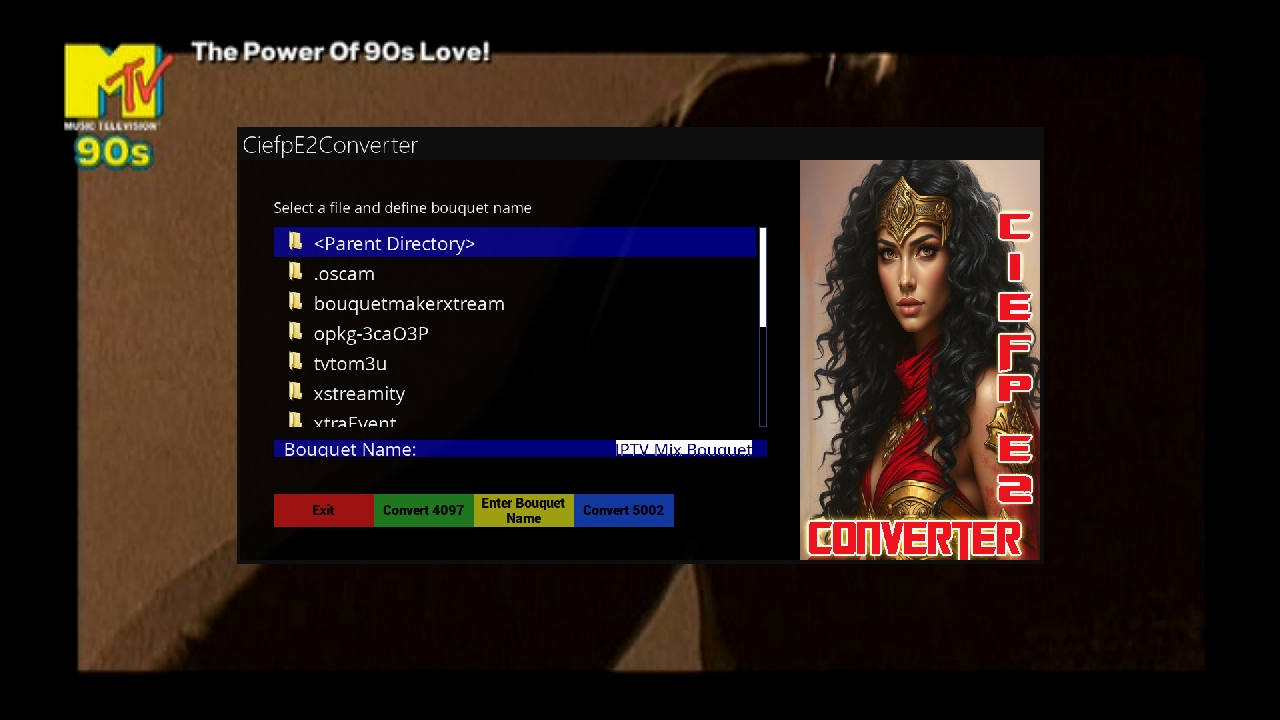
    1. File selection: Browsing the directory and selecting the desired M3U/M3U8 file through the built-in file browser.
    2. File conversion: Converting M3U/M3U8 files into bouquets with different types of services:
    o 4097: For external stream (eg IPTV).
    o 5002: Stream via external player.
    3. Virtual keyboard: Enter the name of the bouquet using the built-in virtual keyboard.
    4. Validation of M3U files: Checks whether the file contains the correct M3U format before conversion.
    5. Bouquet registration: Automatically adds the newly created bouquet to the bouquets.tv system file so that it is available in the Enigma2 interface.
    6. Reload service: Option to automatically refresh the list of channels and bouquets after conversion.

    User interface:
    • Simple design: The interface is intuitive, with clear options for navigation and operation.

    Custom buttons:
    o Red button: Exit the application.
    o Green button: Conversion for 4097.
    o Yellow button: Opening the virtual keyboard for entering the name of the bouquet.
    o Blue button: Conversion for 5002.

    Key advantages:
    • Automation: Reduces the need for manual file editing.


    • Compatibility: Creates bouquets compatible with Enigma2 devices.
    • Simplicity: Adapted for users of all skill levels.

  5. #4
    Super Moderator mehmetkarahanlı's Avatar
    Join Date
    29-12-2017
    Location
    bursa
    Posts
    28,011
    Uploads
    107
    Likes
    17,059

    Re: E²_ Ciefp Settings IPTV Converter by 𝗖𝗶𝗲𝗳𝗽

    Ciefp E2 Converter
    versıon : 1.6
    UPDATE : 28.02.2025
    CiefpE2Converter 1.6


    ------------------------------------------------------------------------------------------------------
    Instructions for using the CiefpE2Converter plugin

    What is CiefpE2Converter?
    CiefpE2Converter is a plugin for Enigma2 devices that allows you to convert M3U playlists (eg IPTV lists) into Enigma2 bouquets.
    This allows you to watch IPTV channels directly through your Enigma2 interface, organized by groups you choose.

    How to use the plugin?
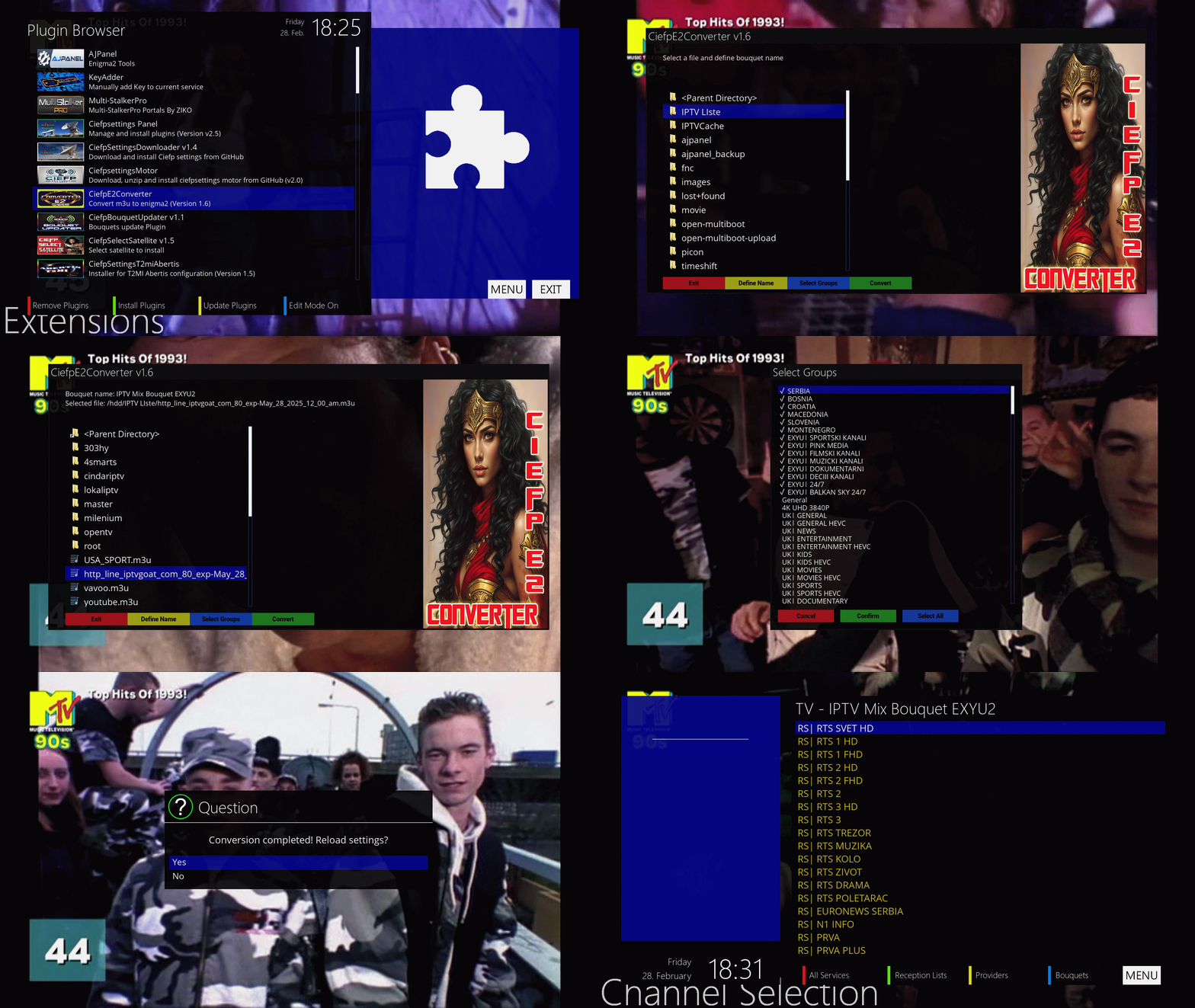
    1. Starting the plugin:
    o Go to the menu of your Enigma2 device, find "Plugins", and select "CiefpE2Converter".

    2. Selection of M3U file:
    o When the plugin opens, you will see a list of files from the /tmp directory.
    o Use the arrows on the remote (up/down) to move through the list of files.
    o Find your M3U file (eg playlist.m3u or playlist.m3u8) and press OK to select it.

    3. Setting the name of the bouquet:
    o Press the yellow button ("Define Name") to enter a name for your bouquet (eg "My IPTV").
    o A virtual keyboard will open. Enter the name using the arrows and the OK button, then press the green button ("Save") to confirm.

    4. Selection of groups:
    o Press the blue button ("Select Groups") to select the groups of channels from the M3U file that you want to include in the bouquet.
    o In a new window you will see a list of available groups (eg "Sports", "Movies", "News").
    o Scroll up/down with the arrows, press OK on each group you want to select - the selected groups will be marked with a "✓" in front of the name.
    o If you want all groups at once, press the blue button ("Select All").
    o When you are done with your selection, press the green button ("Confirm") to confirm.

    5. Conversion:
    o On the main screen, press the green button ("Convert").
    o A menu will open for selecting the type of service (eg Gstreamer, Exteplayer3, Streamlink). Select the desired type of arrows and press OK.
    o The plugin will create a bouquet with the selected groups and the name you entered.

    6. Uploading the bouquet:
    o After the conversion, the plugin will ask if you want to load settings ("Reload settings?").
    o Press Yes (left button) to refresh the channel list on the device, or No (right button) if you want to do it manually later.

    7. Exit:
    o Press the red button ("Exit") or the "Cancel" button on the remote to close the plugin.

    Notes
    • M3U file location: Make sure your M3U file is located in the /tmp directory on the device (you can transfer it via FTP, eg using FileZilla).
    • Supported formats: Plugin works with .m3u and .m3u8 files.
    • Result: After the conversion, the new bouquet will appear in your channel list on the Enigma2 device.

    Purpose
    This plugin is ideal for users who want to organize their IPTV channels into Enigma2 bouquets without manually editing files.
    It allows you to select only the groups you are interested in and easily integrate them into your TV interface.


    DOWNLOAD

    CiefpE2Converter1.6.txt

    Download Above Attachment

  6. #5
    Super Moderator mehmetkarahanlı's Avatar
    Join Date
    29-12-2017
    Location
    bursa
    Posts
    28,011
    Uploads
    107
    Likes
    17,059

    Re: E²_ Ciefp Settings IPTV Converter by 𝗖𝗶𝗲𝗳𝗽


  7. #6
    Super Moderator mehmetkarahanlı's Avatar
    Join Date
    29-12-2017
    Location
    bursa
    Posts
    28,011
    Uploads
    107
    Likes
    17,059

    Re: E²_ Ciefp Settings IPTV Converter by 𝗖𝗶𝗲𝗳𝗽

    Ciefp E2 Converter
    versıon : 1.7
    UPDATE : 21.03.2025
    CiefpE2Converter v1.7

    CiefpE2Converter is an Enigma2 plugin designed to convert M3U playlists into IPTV bouquets that can be used on Enigma2 devices.
    Allows users to easily select groups or individual channels from M3U files, define the name of the bouquet and choose the desired service type
    (eg Gstreamer, Exteplayer3, Streamlink).
    The plugin generates the appropriate "userbouquet" files and registers them in bouquets.tv for immediate use.

    News in version 1.7:
    Support for M3U links in playlist.txt format:
    The plugin now supports loading M3U links from text files (playlist.txt).
    Users can select a link from the list, which is automatically downloaded and parsed for further processing.

    New selection screen (ChannelSelectionScreen):
    Added a new channel selection screen when the M3U file does not contain groups.
    This screen allows users to select individual channels or groups of series,
    with automatic grouping of series episodes under one name (eg "The X Files" instead of "The X Files S01 E01").

    New "Select Similar" button:
    Implemented new "Select Similar" button on GroupSelectionScreen and ChannelSelectionScreen.
    Function: Automatically selects all items (groups or channels) that share a common prefix with the currently marked item. For example:
    For the group "Sport TV 1" selects all groups starting with "Sport TV" (eg "Sport TV 2", "Sport TV HD").
    For the channel "HBO HD" selects all channels starting with "HBO" (eg "HBO 2", "HBO 3").
    This makes it easy to quickly select similar items without having to manually tag each item individually.

    Other characteristics:
    Intuitive interface with the ability to view files in the /tmp directory.
    Adjusting the name of the bouquet via the virtual keyboard.
    Support for different service types (Gstreamer, Exteplayer3, DVB, Radio, Streamlink).
    Automatic registration of bouquets and option to reload settings after conversion.
    This plugin is ideal for users who want to quickly and efficiently organize their IPTV content on the Enigma2 platform,
    with additional flexibility thanks to new functionalities in version 1.7.

    Short instructions for using the plugin CiefpE2Converter v1.7

    Starting the plugin:
    Find CiefpE2Converter v1.7 in the plugins menu on your Enigma2 device and run it.

    Selection of M3U file or link:
    On the main screen (MainScreen) you see a list of files in the /tmp directory.
    If you have an M3U file: Navigate to it (eg playlist.m3u) and press OK.
    If you have a playlist.txt with links: Select the .txt file and press OK. The PlaylistSelectionScreen will open:
    Scroll up/down and select the desired link (press OK or the green "Confirm" button).
    The plugin will download the M3U from that link and continue.

    Defining the name of the bouquet:
    Press the yellow "Define Name" button to open the virtual keyboard.
    Enter the name of the bouquet (eg "My IPTV") and confirm with OK. The default name is "IPTV Mix Bouquet".

    Selection of groups or channels:
    Press the blue "Select Groups" button:
    If the M3U has groups: The GroupSelectionScreen will open. Mark the desired groups:
    OK: Includes/removes a group.
    Select All (blue button): Indicates all groups.
    Select Similar (yellow button): Indicates groups with a similar prefix (eg "Sport TV 1" -> "Sport TV 2").

    If the M3U has no groups: The ChannelSelectionScreen will open. Tag channels or series:
    OK: Turns on/off a channel/series.
    Select All (blue button): Indicates all channels.
    Select Similar (yellow button): Indicates channels with a similar prefix (eg "HBO HD" -> "HBO 2").
    Press the green "Confirm" button to confirm or the red "Cancel" button to cancel.

    Conversion to a bouquet:
    On the main screen, press the green "Convert" button.
    Select the service type (eg "Gstreamer (4097:0:1)") from the list and confirm with OK.
    The plugin creates a bouquet in /etc/enigma2 and registers it in bouquets.tv.

    Reload settings:
    After the conversion, the question "Reload settings?" will appear. Select Yes to refresh the bouquet list or No to exit.

    Exit:
    Press the red "Exit" button to close the plugin.

    Remark:
    Downloaded M3U files are saved in /tmp/m3u_playlist.
    Series in ChannelSelectionScreen are grouped (eg "The X Files" includes all episodes if checked).
    Check if /tmp is available and has enough space to download files.
    This is all you need to know for basic plugin usage!

    ..:: ciefpsettings ::..

    DOWNLOAD

    CiefpE2Converter 1.7.txt

    Download Above Attachment

Advertise Here

Similar Threads

  1. Replies: 8
    Last Post: 24-04-2026, 21:13:13
  2. Update ║➽║E²║Plugin║XcForever 5.x (New)║*.By Lululla║
    By mehmetkarahanlı in forum Enigma2 Plugins
    Replies: 10
    Last Post: 11-04-2026, 17:45:39
  3. E²_ Ciefp Settings Panel Plugin by 𝗖𝗶𝗲𝗳𝗽
    By mehmetkarahanlı in forum Enigma2 Plugins
    Replies: 3
    Last Post: 21-04-2025, 22:27:49
  4. E²_ Ciefp Settings Motor Plugin by 𝗖𝗶𝗲𝗳𝗽
    By mehmetkarahanlı in forum Enigma2 Plugins
    Replies: 6
    Last Post: 03-03-2025, 20:35:02
  5. E²_Ciefp Settings Downloader by 𝗖𝗶𝗲𝗳𝗽
    By mehmetkarahanlı in forum Enigma2 Plugins
    Replies: 3
    Last Post: 22-02-2025, 13:39:51

Posting Permissions

  • You may not post new threads
  • You may not post replies
  • You may not post attachments
  • You may not edit your posts
  •