


Windows Manager
New versıon: 2.3.2
UPDATE : 02/02/2026
Windows Manager 2.3.2
Windows Manager provides an all-in-one system utility for enhancing Windows 10 and 11.
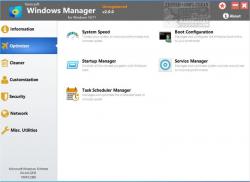
Windows Manager includes over forty utilities that optimize, tweak, clean up, speed up, and repair Windows 10/11. These utilities also help make your system perform faster, eliminate system faults, and increase stability and security. You have the power to personalize your copy of Windows 10/11, tailoring it to your specific needs.
Windows Manager Features:
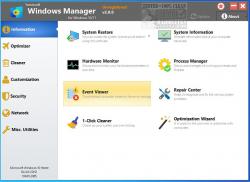
Information
● Creates the system restore point manually; Gets detailed information about your system and hardware, helps you find out the Microsoft product key such as Microsoft Windows and Microsoft Office; Shows and manages all running processes and threads; Repair Center helps to diagnose and fix the various system problems; Cleans up your system just one clicking; Optimization Wizard is useful to the user who is unfamiliar with computers.
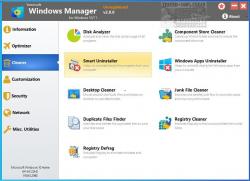
Cleaner
● Disk Analyzer can analyze and view the disk space usage of all programs, files, and folders to find out which engross your disk space and shown with a chart; Cleans up WinSxS folder securely to reduce the component store size; Smart Uninstaller can fully delete programs from your system without residual files and Registry entries; Desktop Cleaner can analyze and move unused shortcuts, files, and folders on desktop to specified folders; Searches and deletes junk files to save disk space and improve performance; Searches and deletes the duplicated files to save your disk space; Registry Cleaner searches Registry to find out and delete the invalid items; Registry Defrag rebuilds and re-indexes your Registry to reduce registry access time and therefore improve application responsiveness and eliminate mistakes and corruption in Registry.
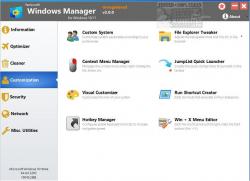
Customization
● Customizes system parameters according to your preferences by tweaking File Explorer, Desktop, Start, Taskbar, and Notification area; Adds files, folders, and system items to This PC and Desktop; Pins the files or folders to your Desktop, Taskbar, or Start; Creates the quick startup items for jumplist on Taskbar; Manages the context menu when right-clicking the file, folder, etc.; Edits the shortcut menu that right-clicks Start button (Win + X shortcut); Customizes the look of your system; Edits and adds the shortcuts that executed on Run dialog box; Tweaks the Windows Apps and Microsoft Modern UI settings.
Security
● Tweaks system, components, UAC, Sign in settings, adjusts various settings, and restricts access to drives and programs to improve system security; Safeguard your sensitive files and folders security, encrypt files, move system folders to safe locations; Privacy Protector ensures privacy and keeps sensitive information secure by eliminating tracks; File Undelete recovers and restores deleted or formatted files on logical disks; Locks some system features to improve security.
Network
● Optimizes and tweaks your internet connection and network settings; Tweaks Microsoft Internet Explorer browser settings; IP Switcher can switch between different network settings easily; Edits the Hosts file to speed up system surfing internet; Wi-Fi Manager can view and manage all your wireless network
Misc. Utilities
● Creates scheduled tasks or the monitorings that trigger tasks; Shows and run the useful collection of utility that built-in your Windows; Splits a file into several smaller files or merges back to the original file; Super Copy is the powerful tool to copy files or backup automatically; Operates your Registry easily using the Registry Tools.
DOWNLOAD
http://windowsmanager.exe
http://windowsmanager_portable.zip


 Reply With Quote