


PotPlayer- 2
versıon
UPTADE: 01.04.2026 /
PotPlayer 1.7.22851
Download PotPlayer 26.4.1 Final - Direct Download Links
Why Choose PotPlayer?
PotPlayer is built for those who demand top-tier performance without sacrificing usability. It supports virtually every video and audio format out there, so you won’t have to hunt for pesky codec packs. Plus, it’s optimized for hardware acceleration, meaning even high-definition videos glide effortlessly across your screen. If you like personalizing your media experience, PotPlayer’s robust customization options let you tweak everything from hotkeys to skins to subtitle appearances.
Key Features That Make It Stand Out
● Wide Format Support: Forget compatibility headaches—PotPlayer plays MP4, MKV, AVI, FLV, MP3, FLAC, and dozens more audio and video formats right out of the box. No more codec installs necessary.
● Smooth Performance & Hardware Acceleration: Got an older PC? No problem. PotPlayer uses DXVA, CUDA, and QuickSync acceleration to ensure seamless video playback while keeping CPU usage low. Say goodbye to choppy videos and system slowdowns.
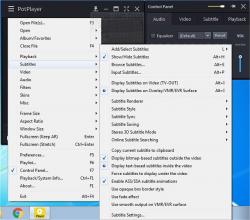
● Advanced Subtitle Support: Enjoy foreign films or need subtitles? PotPlayer has extensive subtitle compatibility, covering SRT, ASS, SSA, VobSub, and even Blu-ray subtitles. You can adjust their size, position, and timing to get them just right.
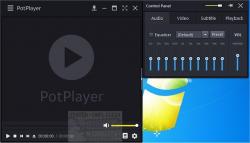
● Highly Customizable Playback Controls: Speed up or slow down playback, fine-tune audio with built-in equalizers, apply video filters, or configure multiple sound cards without digging through endless menus. PotPlayer puts the control in your hands.
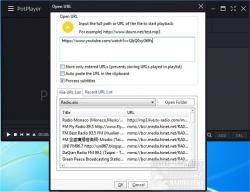
● Seamless Playlist Management & Auto-Resume: Ever forget where you left off? PotPlayer remembers the last 200 files you played and resumes right where you left off, making binge-watching effortless.
● 3D and 360-Degree Video Support: PotPlayer isn’t just for standard videos—it supports 3D playback with various 3D glasses and multiple output formats like Side by Side, Top and Bottom, and Page Flipping. You can even watch interactive 360-degree videos for a fully immersive experience.
● Built-in Screen Capture & Bookmarking: Want to grab a quick snapshot of a scene? PotPlayer lets you take screenshots or even record segments of a video. You can also bookmark your favorite scenes to instantly jump back to those epic moments.
● Minimal System Impact: Perfect for Everyday Use Unlike bloated media players, PotPlayer keeps things lightweight and efficient—even when dealing with high-resolution content. It doesn't bog down your system and works excellent on both new and older hardware
DOWNLOAD
Downloading PotPlayer 1.7.22851
http://PotPlayerSetup (3).exe
http://PotPlayerSetup64 (23).exe
Download PotPlayer 26.4.1 Final - Direct Download Links
http://PotPlayerSetup (5).exe
http://PotPlayerSetup (6).exe


 Reply With Quote